If you have ever worked on Sales Order enhancements, you already know this pain 😄.
One developer adds logic in MV45AFZZ. Another developer adds a different logic in the same user exit. Suddenly transports clash, code gets overwritten, and everyone starts asking the classic question:
“Who touched MV45AFZZ last?”
This is exactly why many SAP projects turn messy over time.
In this article, we’ll learn how to create and implement a custom BADI on MV45AFZZ so that multiple developers can enhance Sales Order processing in parallel, without conflicts, dependencies, or late‑night firefighting.
If you already work with user exits, this approach will feel like a breath of fresh air.

Classic user exits in MV45AFZZ allow only one implementation, which quickly becomes a bottleneck when multiple requirements hit the same exit.
A custom BADI acts as a clean extension layer on top of user exits.
With this approach, you can:
Separate business logic cleanly
Allow parallel development
Avoid transport conflicts
Keep MV45AFZZ readable and maintainable
If you are already creating custom fields in Sales Orders using approaches like create custom fields in SAP S/4HANA using Fiori, this BADI pattern fits perfectly into the same clean‑extension mindset.
In short: fewer conflicts, fewer arguments, happier developers 😄.
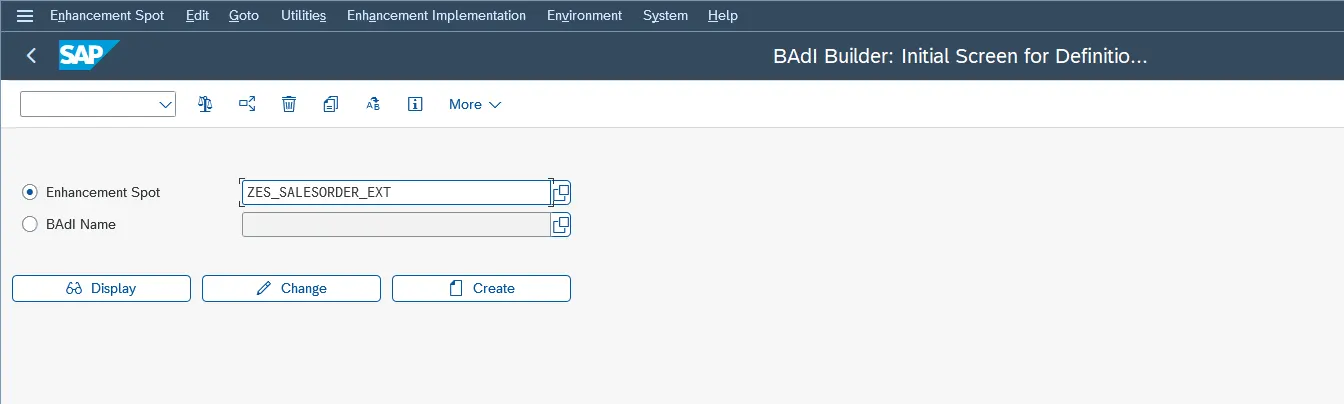
Start with transaction SE18.
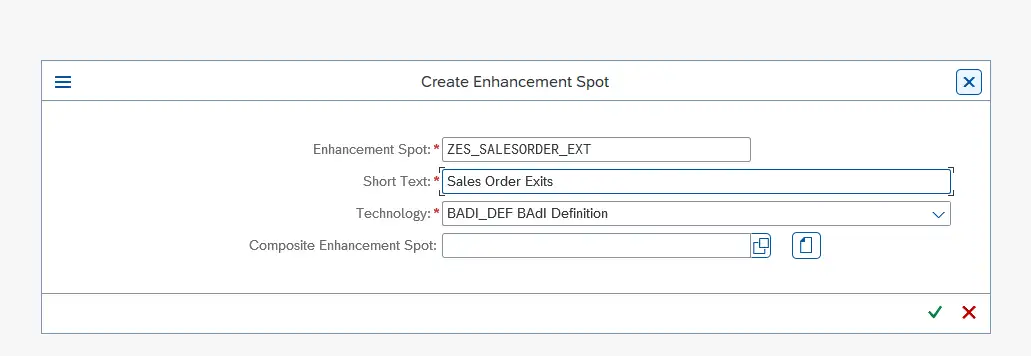
Create a new Enhancement Spot. Think of this as a container that can hold multiple custom BADIs related to Sales Order processing.
This is important because one enhancement spot can later support:
Header-level enhancements
Item-level enhancements
Save validations
Activate the enhancement spot once it is created.
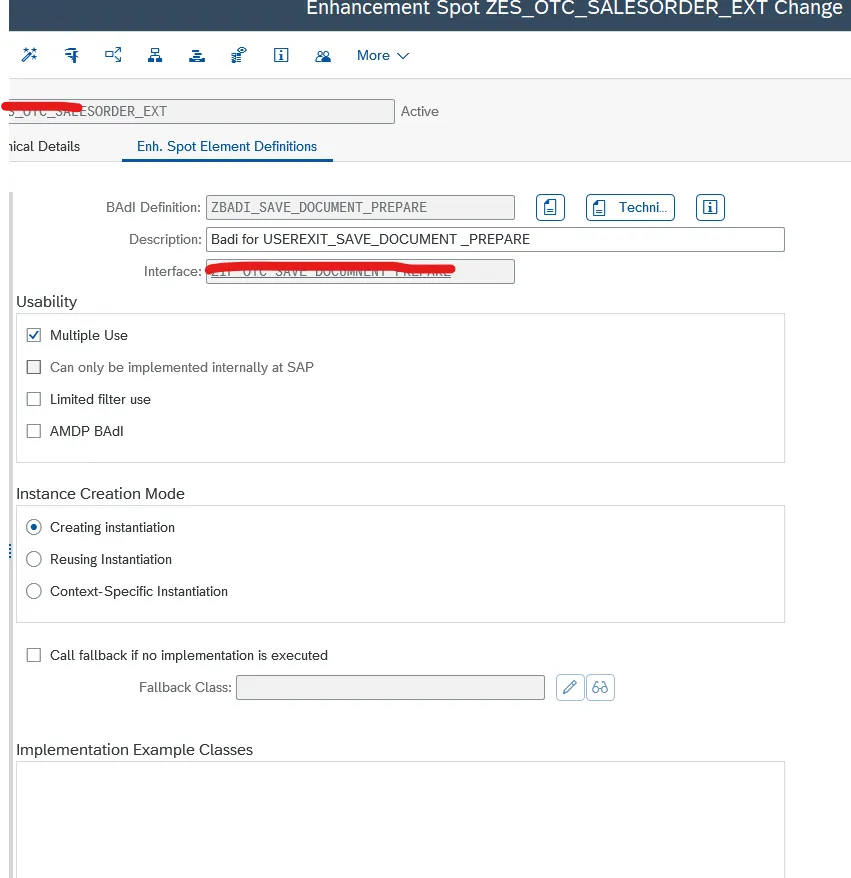
Inside the enhancement spot, click Create → BADI Definition.
In this example, we want to enhance the following user exit:
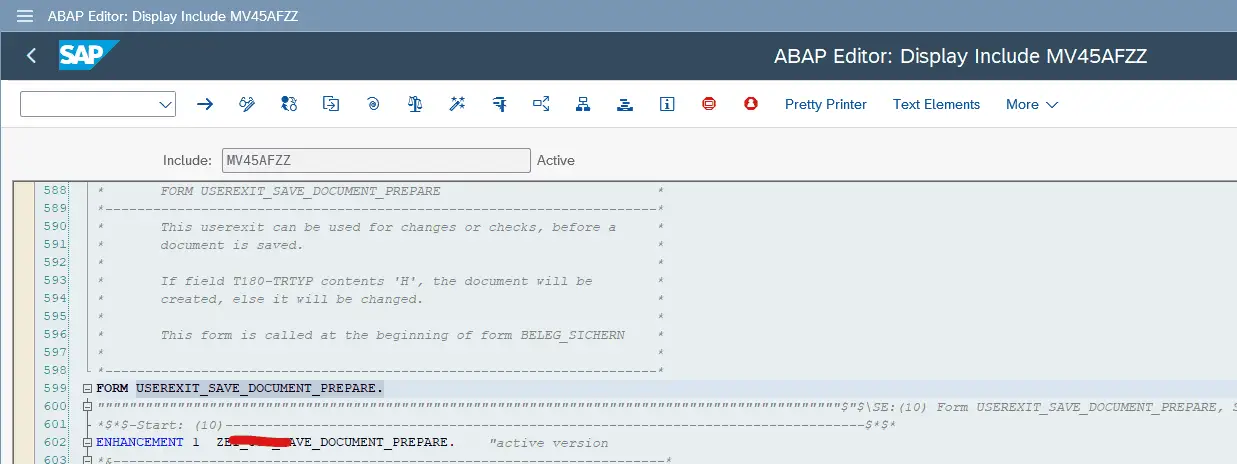
MV45AFZZ – USEREXIT_SAVE_DOCUMENT_PREPARE
Provide a meaningful BADI name, for example:
ZBADI_SAVE_DOCUMENT_PREPARE
This BADI definition will later be called from MV45AFZZ, but it will not contain any business logic itself.
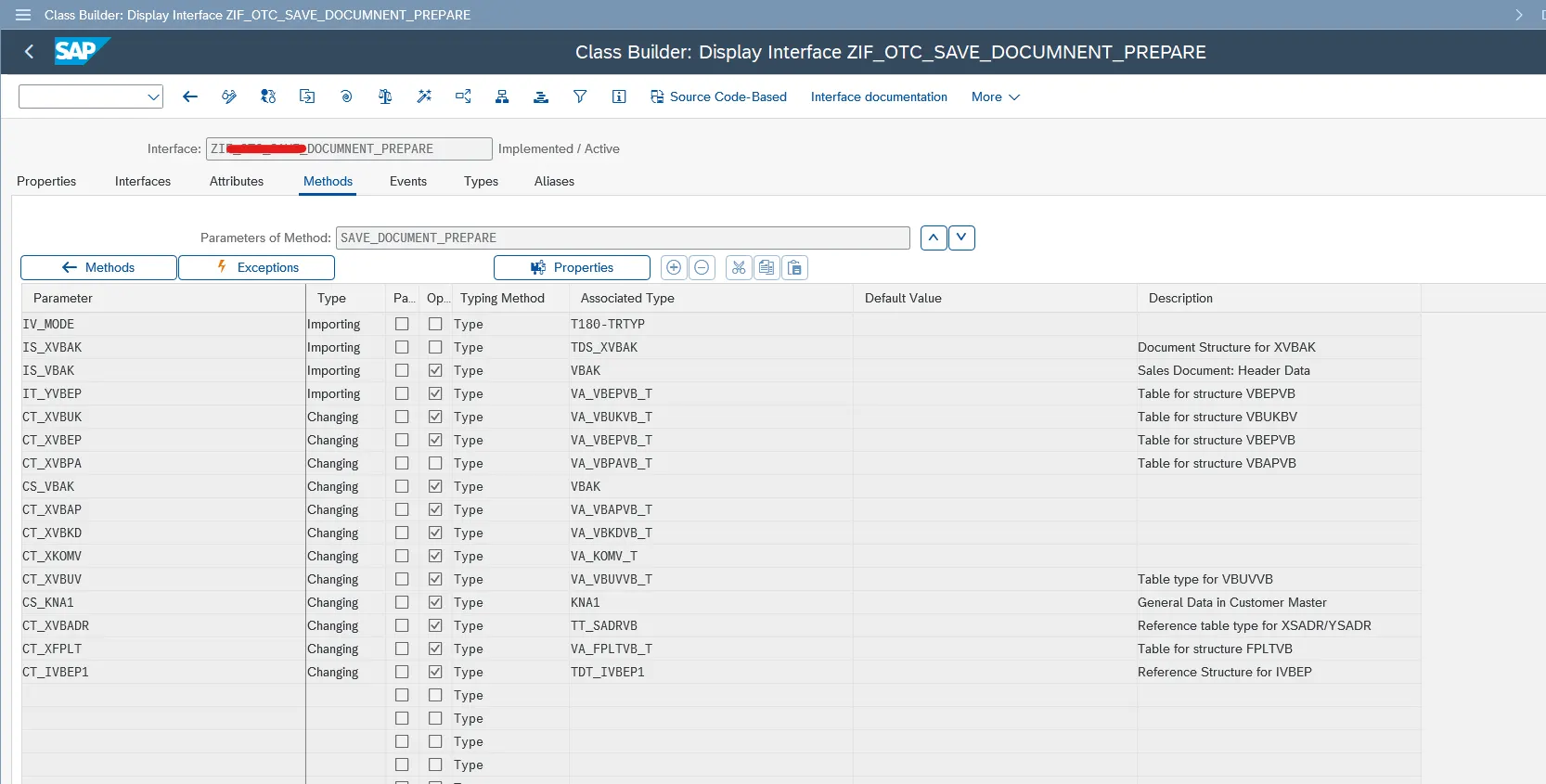
Every BADI needs an interface. This interface defines how data flows from the user exit into your enhancement logic.
Create a new interface and define parameters that match the user exit interface.
You can also add additional parameters if your business scenario requires them.
Once done:
Assign the interface to the BADI definition
Activate both the BADI definition and the Enhancement Spot
If activation works without errors, you’re good to move on.
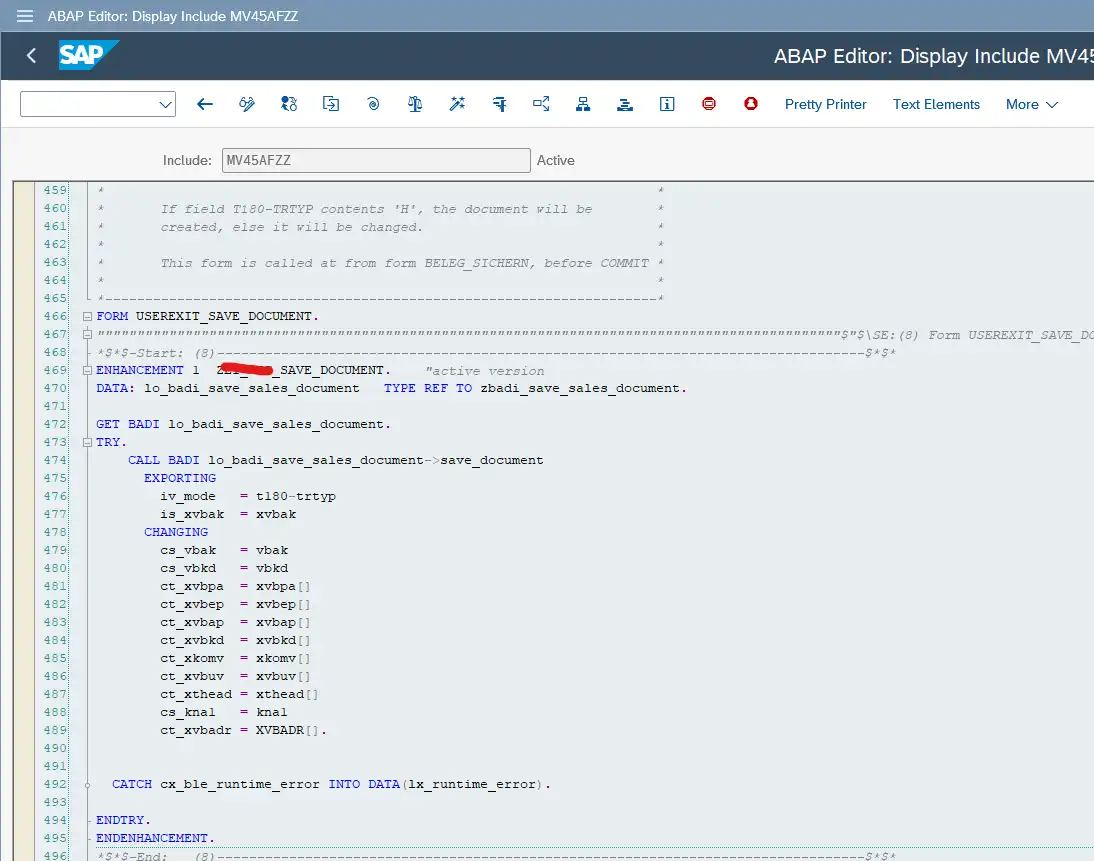
Now comes the most critical step — connecting the custom BADI to the user exit.
Open MV45AFZZ and navigate to:
FORM USEREXIT_SAVE_DOCUMENT_PREPARE.
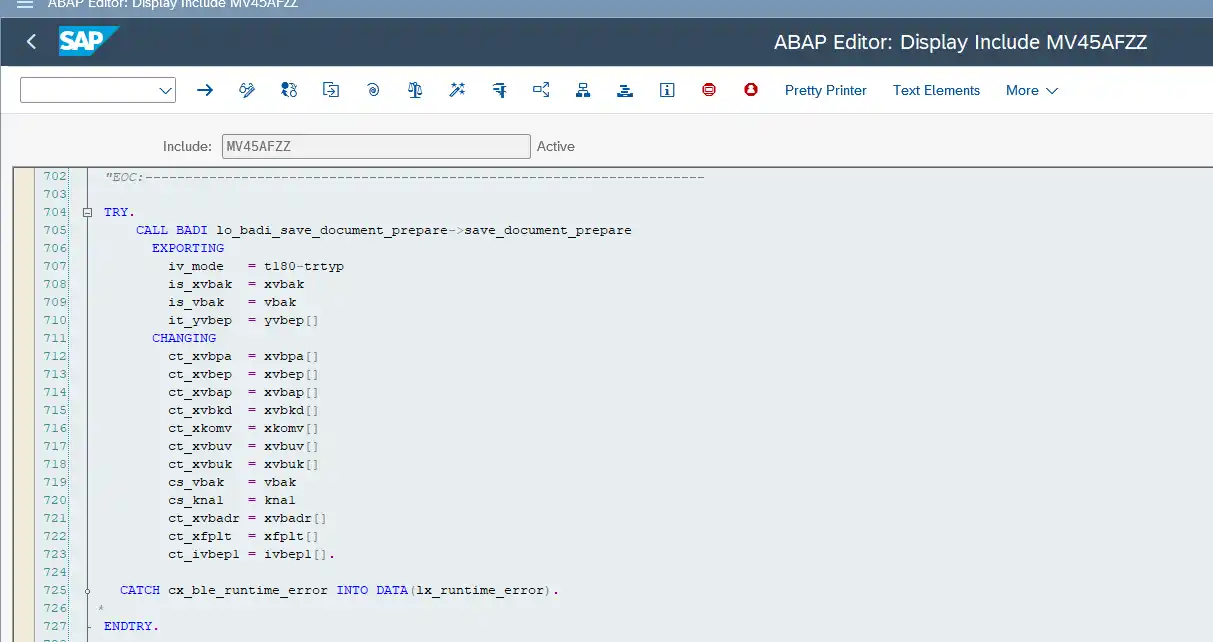
Create an enhancement point inside this FORM and add the BADI call.
This is all that should exist inside MV45AFZZ.
No validations. No business logic. Just the BADI call.
USEREXIT_SAVE_DOCUMENT_PREPARE.
This keeps the user exit clean and future‑proof.
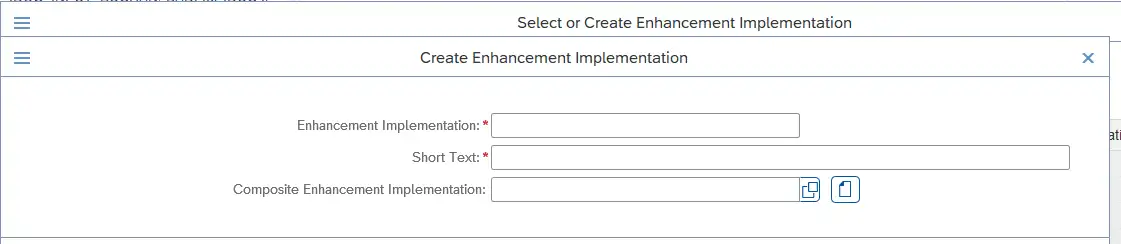
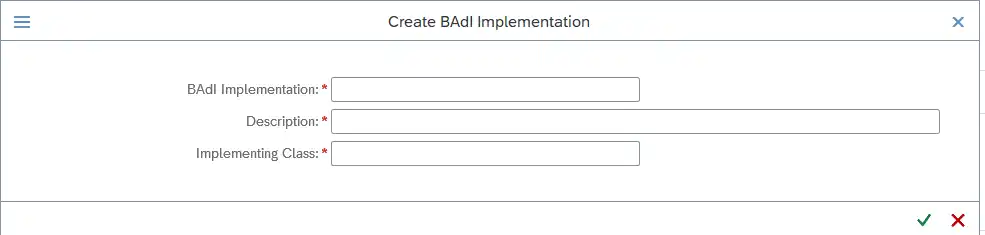
Right‑click on the custom BADI and choose Create Implementation.
SAP will guide you through creating:
Enhancement Implementation
BADI Implementation
Custom ABAP class
This ABAP class is where your real logic belongs.
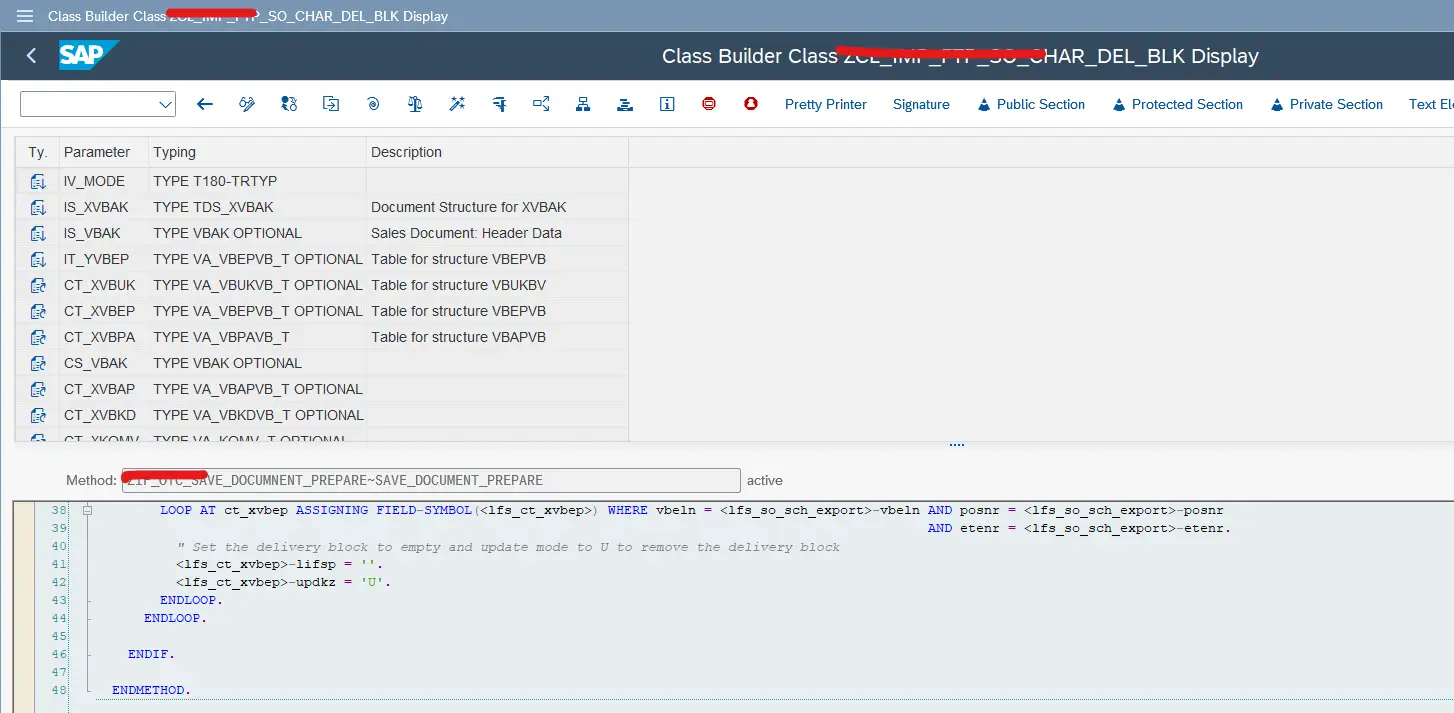
Open the generated ABAP class and navigate to:
Interface → Method
Write your business logic here.
Typical use cases include:
Sales order validations
Defaulting values
Custom checks
Integration triggers
In many projects, such validations are driven by customizing tables maintained via SM30, where TMG events ensure data consistency before Sales Order logic runs.
The biggest advantage?
👉 Multiple developers can create multiple BADI implementations without touching each other’s code.
You are not limited to just one user exit.
Within the same enhancement spot, you can create additional BADIs for exits like:
USEREXIT_MOVE_FIELD_TO_VBAK
USEREXIT_MOVE_FIELD_TO_VBAP
USEREXIT_SAVE_DOCUMENT
Each BADI can be called from its respective FORM in MV45AFZZ.
This pattern scales beautifully in large projects.
❌ Writing business logic directly in MV45AFZZ
This completely defeats the purpose of using a custom BADI. MV45AFZZ should contain only the BADI call, nothing else.
❌ Forgetting to activate the Enhancement Spot
If the enhancement spot is inactive, your BADI will never trigger.
❌ Mismatch between user exit parameters and BADI interface
Incorrect or missing parameters cause runtime issues and debugging nightmares.
❌ Creating too many Enhancement Spots
One well-designed enhancement spot is usually enough for all Sales Order exits.
❌ Treating the BADI implementation like a dumping ground
Each implementation should handle one responsibility, not everything.
Can multiple developers implement the same custom BADI?
Yes. Each developer can create their own BADI implementation, which allows parallel development without transport conflicts.
Is this approach upgrade-safe?
Absolutely. The solution uses SAP’s official enhancement framework and does not modify standard SAP code.
Can this pattern be used outside Sales Orders?
Yes. The same custom BADI approach can be applied to other classic user exits across different SAP modules.
Do I need to remove existing logic from MV45AFZZ?
Ideally, yes. Move business logic into BADI implementations and keep MV45AFZZ limited to BADI calls only.
Will this impact system performance?
No, not significantly. As long as your BADI logic is optimized, performance remains stable and predictable.
Custom BADIs are the cleanest way to enhance Sales Order processing without conflicts.
You learned how to create an enhancement spot, define and call a custom BADI in MV45AFZZ, and implement logic safely in separate classes.
Happy coding — and may your enhancements never clash again 😄

“SAP solution architect with a strong problem-solving mindset, sharing practical SAP S/4HANA and ABAP insights from real-world projects.”
"SAP solution architect with a strong problem-solving mindset, sharing practical SAP S/4HANA and ABAP insights from real-world projects."
https://fiowelt.com