• April 6, 2026
  • Kishore Thutaram
  • 0

Introduction

In real-world SAP integrations, sending standard invoice data is often not enough. Outbound IDOCs for external systems often require businesses to include additional custom fields.

In this guide, we’ll walk through how to send a customer invoice with custom fields using an IDOC extension, using real-time techniques followed in SAP projects.

SAP IDOC invoice with custom fields extension process

Business Scenario

A company needs to send invoice data to an external system, but standard IDOC segments do not include the following:

  • Custom material attributes
  • Additional business-specific fields
  • Enhanced item-level data

Because of this:

  • External systems lack the required data
  • Manual mapping becomes complex
  • Integration fails or becomes inefficient

This requires extending the IDOC structure with custom segments and fields.

Solution Overview

We solve this using:

  • IDOC Extension (WE30 / WE31)
  • User Exit implementation
  • Custom segment population logic

What this solution does:

  • Enhances standard invoice IDOC
  • Adds custom fields dynamically
  • Ensures seamless outbound integration

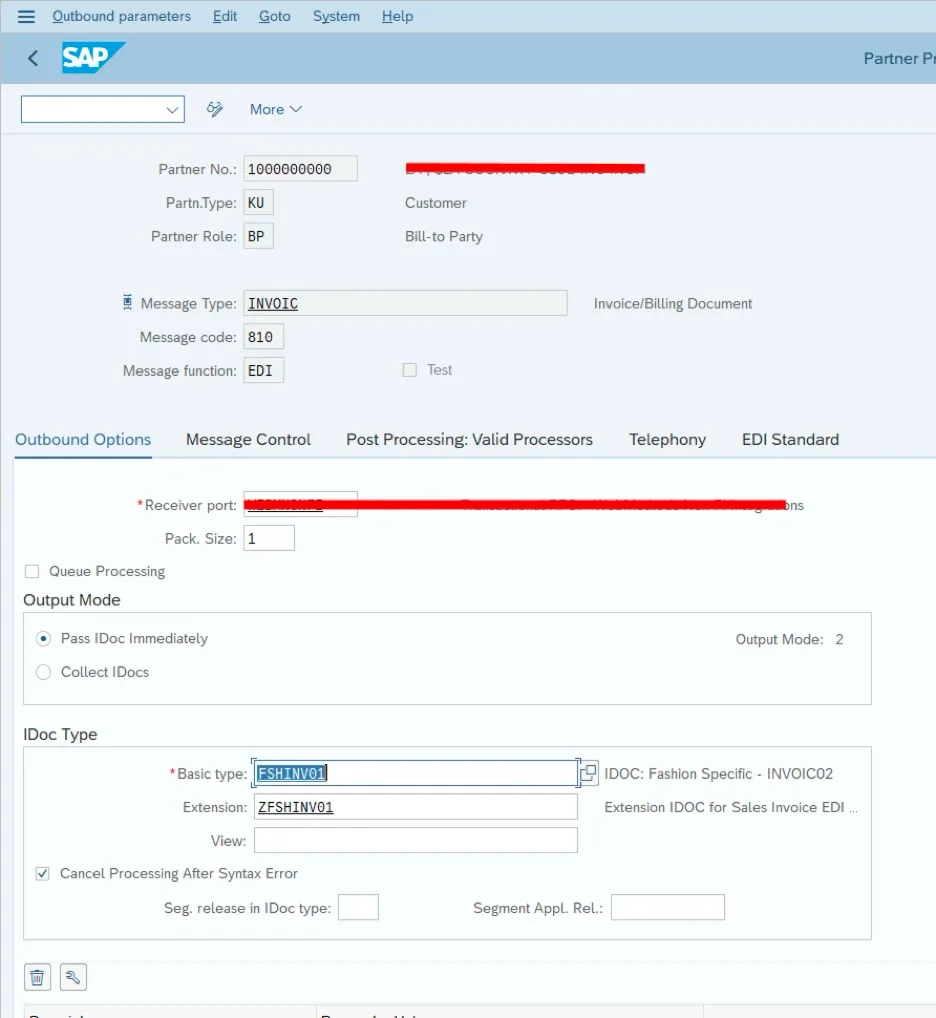
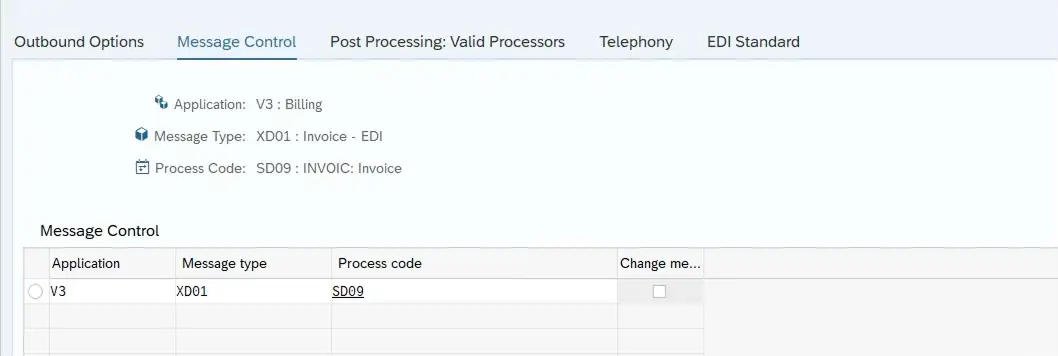
Step 1: Maintain Partner Profile (WE20)

Configure outbound parameters for the invoice message type.

This ensures IDOC is triggered correctly.

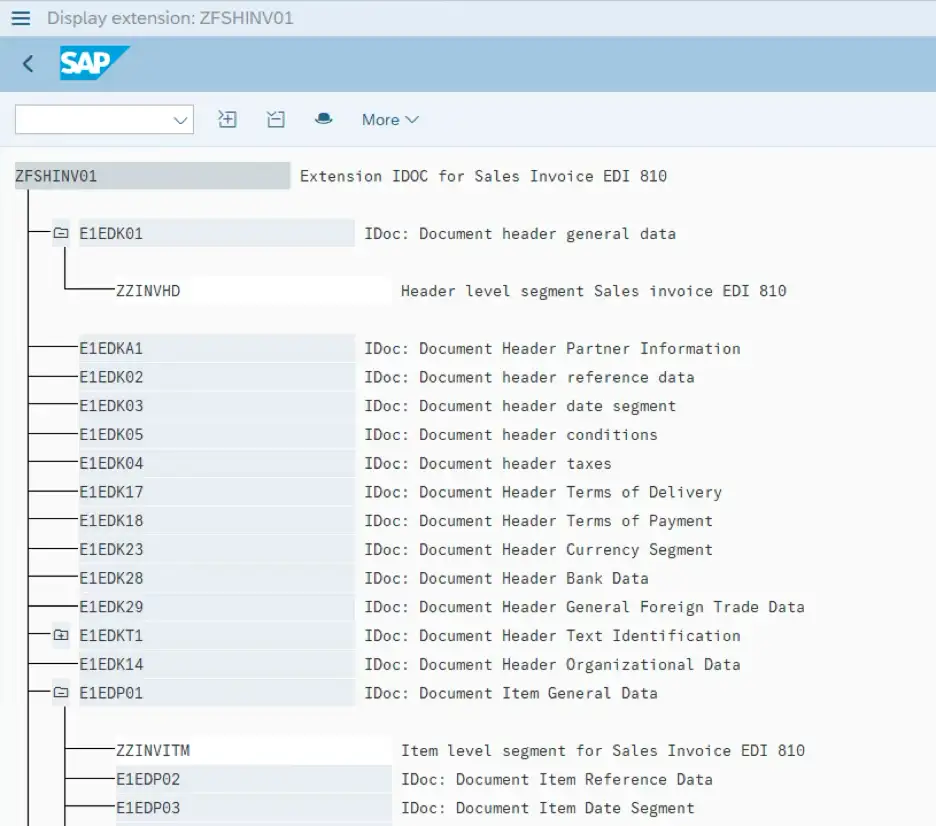
Step 2: Create IDOC Extension (WE30 / WE31)

  • Create a custom segment (e.g., ZZINVITM)
  • Add required custom fields

If you’re new to IDOC structure and segments, understanding the data flow is important — refer to your guide on handling integrations, such as receiving sales orders via IDOC, which clearly explains the segment hierarchy.

Step 3: Find and Implement User Exit

Use:

  • Function Module: EXIT_SAPLVEDF_002
  • Exit: EXIT_SAPLV56K_002
  • Include: ZXEDFU02

This is where custom logic is written.

If you’re unsure how to debug exits and enhancement logic, it’s worth checking your guide on debugging ABAP programs effectively to trace IDOC processing step-by-step.

Step 4: Populate Custom Segment Data

SELECT matnr, zz_mchl1, zz_mchl2, zz_mchl3 
FROM mara
INTO TABLE @DATA(lt_zzinvitm)
FOR ALL ENTRIES IN @lt_xtvbdpr
WHERE matnr = @lt_xtvbdpr-matnr.

LOOP AT int_edidd ASSIGNING <fs_edidd> WHERE segnam = 'E1EDP01'.

lv_index = sy-tabix + 1.

DATA(ls_custom_seg) = VALUE #( int_edidd[ lv_index ] OPTIONAL ).

IF is_int_edidd-segnam = 'E1EDP19' AND ls_custom_seg-segnam <> 'ZZINVITM'.

ls_e1edp19 = is_int_edidd-sdata.

DATA(ls_xtvbdpr1) = VALUE #( xtvbdpr[ matnr = ls_e1edp19-idtnr ] OPTIONAL ).

IF ls_xtvbdpr1 IS NOT INITIAL.

DATA(ls_zzinvitm) = VALUE #( lt_zzinvitm[ matnr = ls_e1edp19-idtnr ] OPTIONAL ).

IF ls_zzinvitm IS NOT INITIAL.

ls_edidd-segnam = 'ZZINVITM'.
ls_edidd-psgnum = 'E1EDP01'.

ls_edidd-sdata = VALUE zzinvitm(
zzmchl1 = ls_zzinvitm-zz_mchl1
zzmchl2 = ls_zzinvitm-zz_mchl2
zzmchl3 = ls_zzinvitm-zz_mchl3
).

INSERT ls_edidd INTO int_edidd INDEX lv_index.

ENDIF.
ENDIF.
ENDIF.

ENDLOOP.

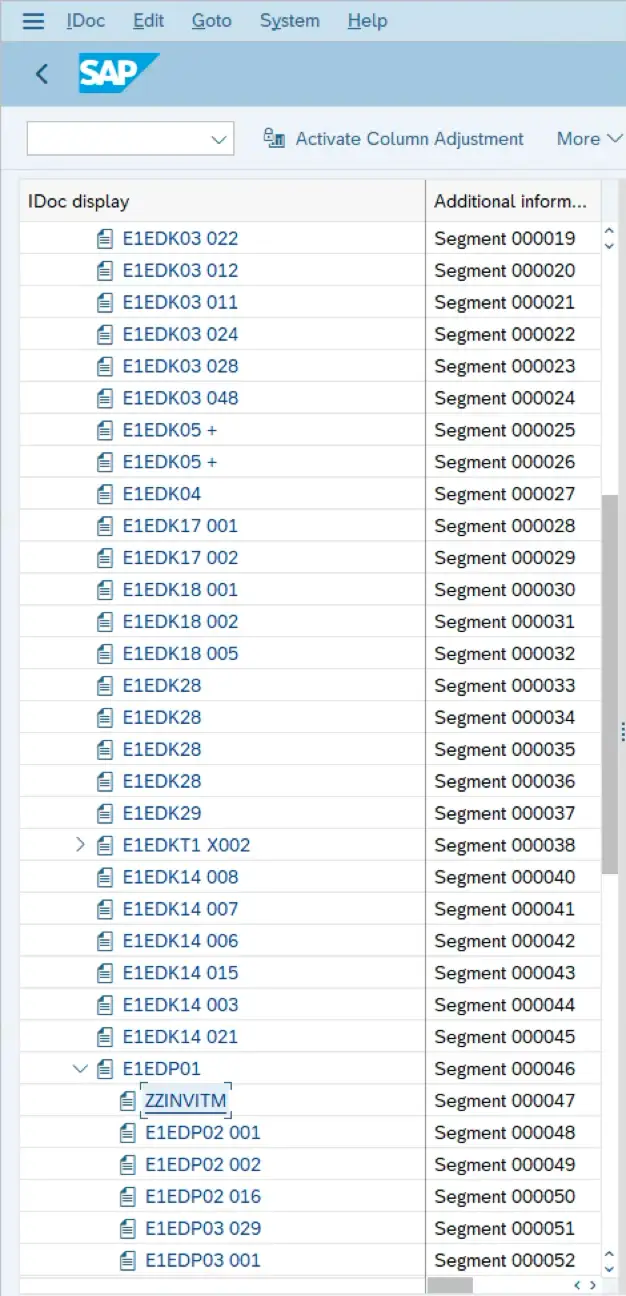
Step 5: Test Output (WE02)

  • Execute invoice output
  • Check IDOC in WE02
  • Verify custom segment data

If performance issues occur while processing large IDOCs, follow best practices from your ABAP performance tuning techniques guide to optimize data handling.

output

Common Errors & Fixes

  • IDOC extension not triggered → Check partner profile
  • Custom segment not appearing → Verify exit logic
  • Data not populated → Debug include ZXEDFU02
  • Performance issues → Avoid SELECT inside loops
  • Wrong segment hierarchy → Ensure correct parent-child linkage

Frequently Asked Questions

Can we extend standard IDOCs?
Yes, using IDOC extensions (WE30/WE31).

Where do we write custom logic?
Inside user exits like EXIT_SAPLVEDF_002.

How to debug IDOC processing?
Use WE02 + breakpoints in exit include.

Can we add multiple custom segments?
Yes, based on business requirement.

🎉 Final Thoughts

Extending IDOCs to include custom invoice fields is a common real-world requirement in SAP integrations.

By using:

  • IDOC extensions
  • User exits
  • Efficient data handling

You can build scalable and reliable outbound integrations.

Share article

Kishore Thutaram

SAP Solution Architect | 16+ Years' Experience in SAP | Sharing Practical SAP Knowledge | Engineering Graduate with Expertise in SAP Architecture

https://fiowelt.com

Leave a Reply

Your email address will not be published. Required fields are marked *