• January 22, 2026
  • Kishore Thutaram
  • 0

Introduction

“In this guide, we’ll learn how to create custom event in SAP S/4HANA using RAP and trigger it via SAP Event Mesh with a real-world Sales Order scenario.”

Let’s be honest 😄 — SAP loves silence. You save a Sales Order, SAP nods politely, and nothing else happens.

But what if your Sales Order could talk? 📣 What if, the moment it’s created or updated, it politely taps SAP BTP on the shoulder and says:

“Hey buddy, something just changed. You might want to know this.”

That’s exactly what custom events using RAP do.

In this guide, we’ll learn how to create a custom event in SAP S/4HANA using RAP and trigger it via SAP Event Mesh when a Sales Order Item is saved. No Part A, no Part B, no artificial breaks — just a smooth, logical flow, like a well-written ABAP program 😉.

By the end of this article, you’ll confidently:

  • Design RAP-based events

  • Bind them correctly

  • Trigger them during Sales Order save

  • Monitor them without panic

So grab your chai ☕ — let’s make SAP a little more chatty.

Create custom event in SAP S/4HANA using RAP and SAP Event Mesh

Scenario

"Send sales order item info to BTP upon sales order Save."

Part A: Event Generation

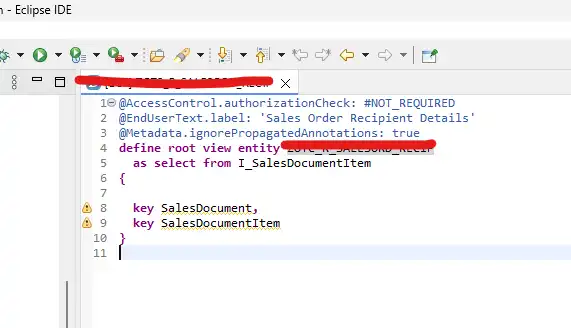
Step 1: Create a “Root CDS View Entity “with sales order key fields.

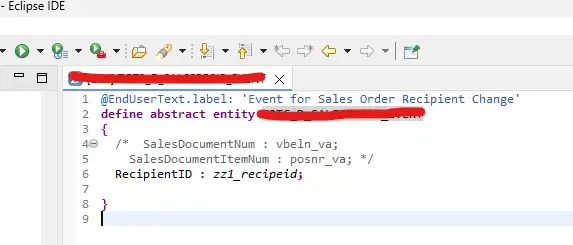
Step 2: Create an “Abstract CDS entity” with all the additional sales order fields that are needed to send BTP

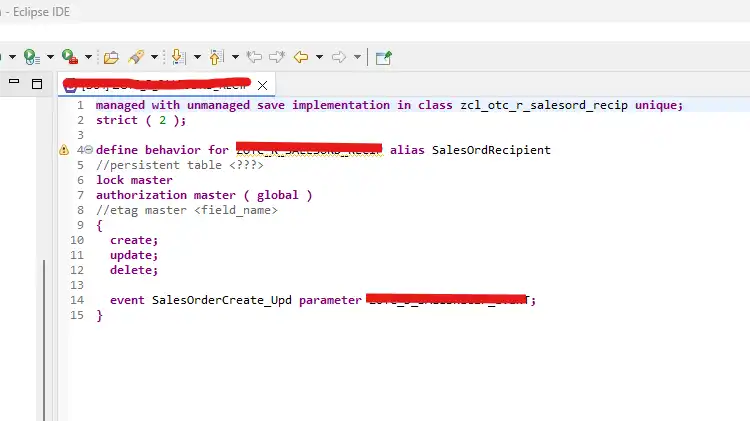
Step 3: Crete a “Behaviour definition “with managed and unmanaged save implementation on Root CDS, which is created in the first step.

Provide the Zclass to implement the behaviour methods.

Add an event in behaviour definition ex:SalesOrderCreate_Upd with parameter “Abstract CDS entity”, which is created in the second step.

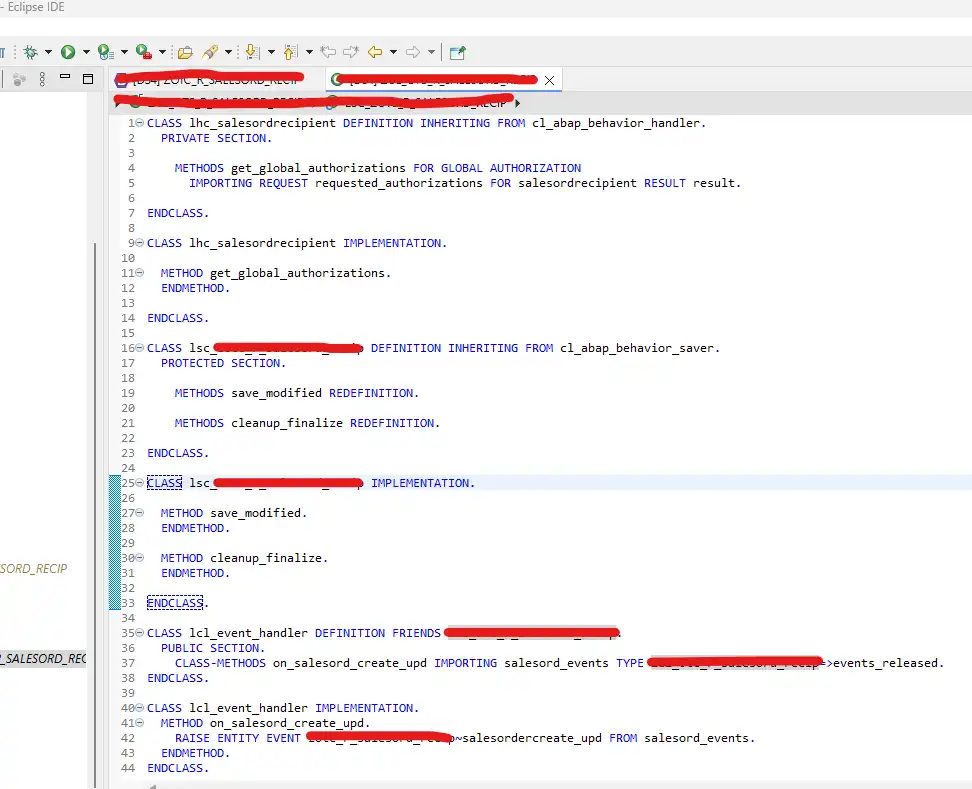
Step 4: In the behaviour implementation, SAP generates the methods in custom class as below. – No need of any manual additional changes in this step.

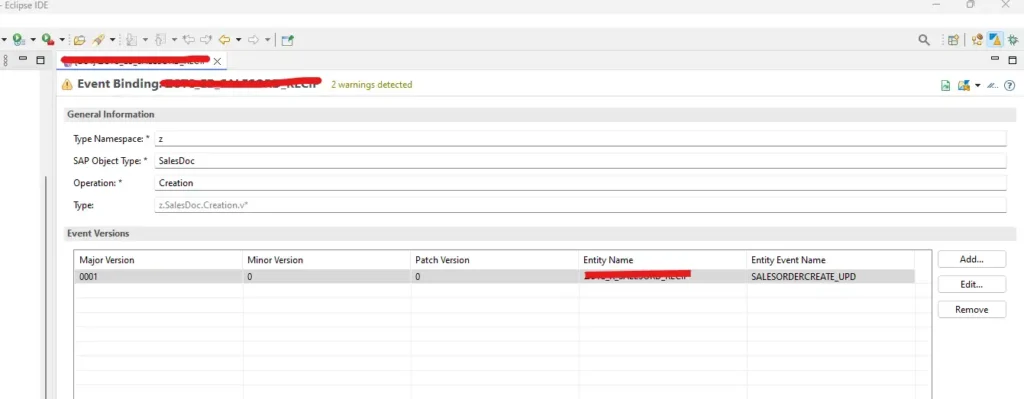
Step 5: Create “Event Binding”. Right click on your package and look for event binding like CDS entity creation.

Provide the below details for event binding.

Entity name = “Root Entity”, which is created in first step

Event name = Event name mentioned in behaviour definition

Part B: Trigger the Event

Step 1: Find the appropriate sales order user exit

in this scenario the user exit name is USEREXIT_SAVE_DOCUMENT – it triggers after saving the sales order

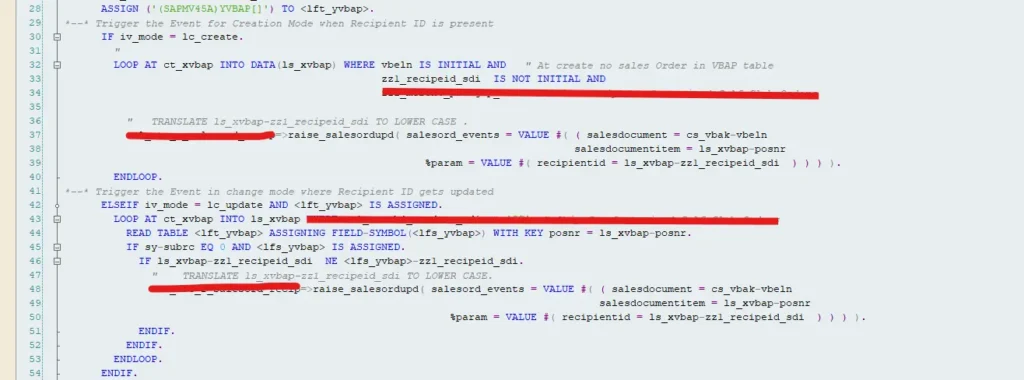
Step 2: Implement the below code for Creation and Change of sales order

 ASSIGN (‘(SAPMV45A)YVBAP[]’) TO <lft_yvbap>.

    
        *--* Trigger the Event for Creation Mode when Recipient ID is present
      IF iv_mode = ‘H’.
        "
        LOOP AT xvbap INTO DATA(ls_xvbap) WHERE vbeln IS INITIAL AND                                                      zz1_recipeid_sdi  IS NOT INITIAL.

          
          =>raise_salesordupd( salesord_events = VALUE #( ( salesdocument =  vbak-vbeln
                                                                                  salesdocumentitem = ls_xvbap-posnr
                                                          %param = VALUE #( recipientid = ls_xvbap-zz1_recipeid_sdi  ) ) ) ).
        ENDLOOP.
*--* Trigger the Event in change mode where Recipient ID gets updated
      ELSEIF iv_mode = ‘V’.
        LOOP AT xvbap INTO ls_xvbap.
          READ TABLE  ASSIGNING FIELD-SYMBOL() WITH KEY posnr = ls_xvbap-posnr.
          IF sy-subrc EQ 0 AND  IS ASSIGNED.
            IF ls_xvbap-zz1_recipeid_sdi  NE -zz1_recipeid_sdi.

              =>raise_salesordupd( salesord_events = VALUE #( ( salesdocument = vbak-vbeln
                                                                                      salesdocumentitem = ls_xvbap-posnr
                                                              %param = VALUE #( recipientid = ls_xvbap-                  zz1_recipeid_sdi  ) ) ) ).
            ENDIF.
          ENDIF.
        ENDLOOP.
      ENDIF.


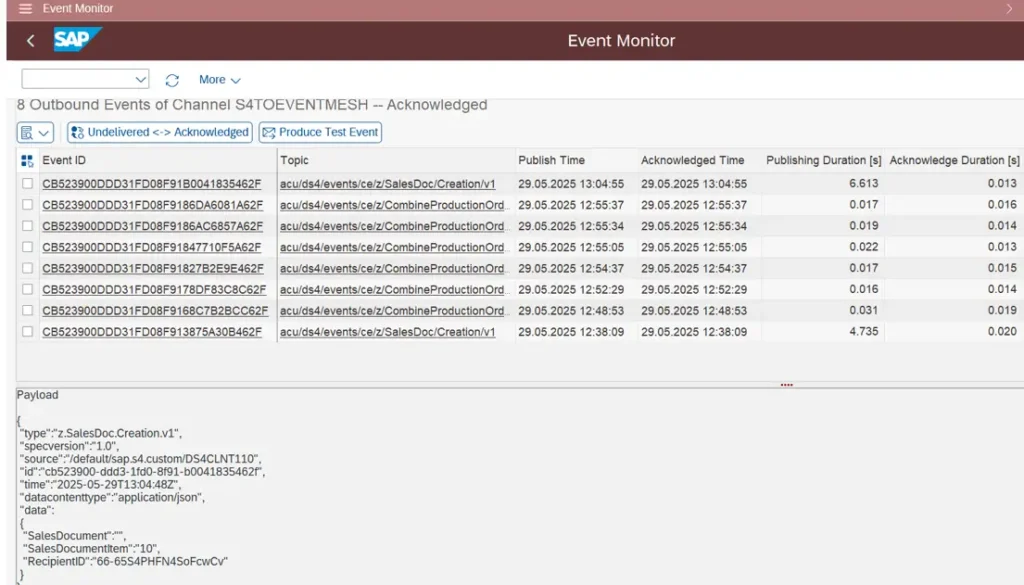
Step 3: Check the output within S/4

Transaction /IWXBE/EVENT_MONITOR

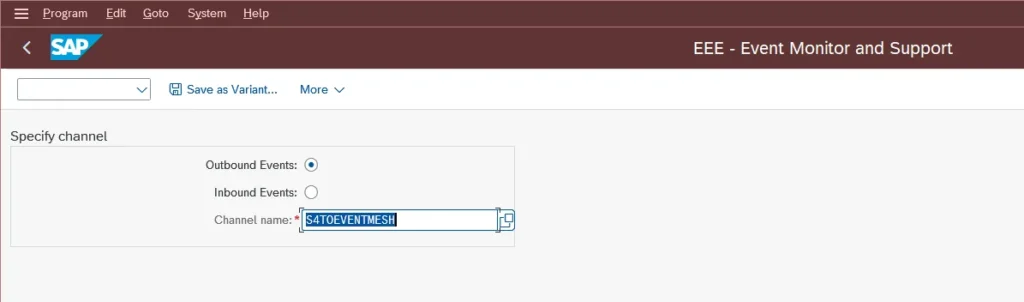
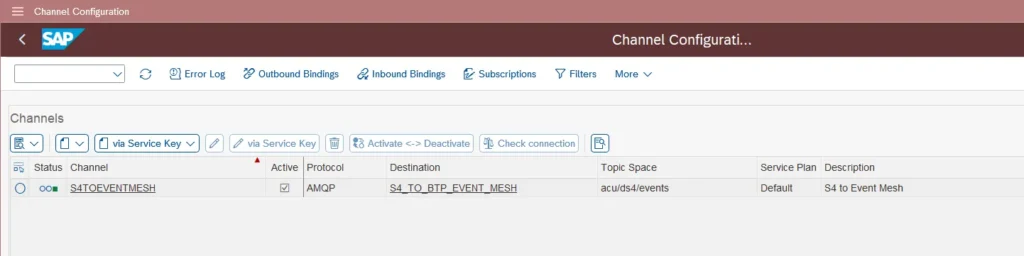
To make this tcode operational. configuration is needed for outbound event monitor with a channel name.

Channel Configuration: Tcode /IWXBE/CONFIG

🎉 Final Thoughts

You’ve now successfully turned a boring Sales Order save into an event-driven masterpiece.

SAP S/4HANA talks. RAP listens. Event Mesh delivers. BTP reacts.

That’s modern SAP — and you’re officially part of it 🚀

Happy coding!

Share article

Kishore Thutaram

"SAP solution architect with a strong problem-solving mindset, sharing practical SAP S/4HANA and ABAP insights from real-world projects."

https://fiowelt.com

Leave a Reply

Your email address will not be published. Required fields are marked *