Kishore Thutaram
SAP Solution Architect | 16+ Years' Experience in SAP | Sharing Practical SAP Knowledge | Engineering Graduate with Expertise in SAP Architecture
https://fiowelt.comIn real-time business scenarios, standard IDOC structures often fall short when you need to send additional data to external systems. This is especially true for outbound deliveries where custom fields play a key role in integrations like WMS, 3PL, or third-party logistics platforms.
In this guide, we’ll walk through how to extend delivery IDOCs and send custom fields using enhancements in SAP.
A business needs to send outbound delivery data along with custom fields to an external system for accurate logistics processing and tracking.
To achieve this, we enhance the standard delivery IDOC by:
Creating custom segments
Extending the IDOC structure
Populating custom fields using user exits
Sending the enhanced IDOC to the target system
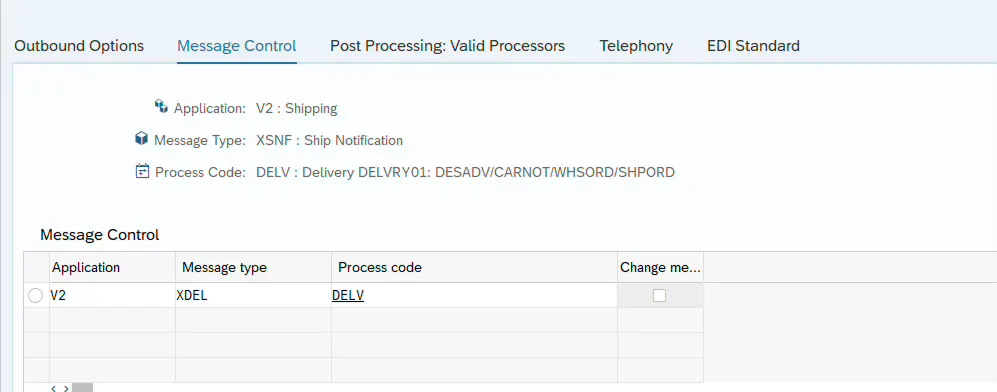
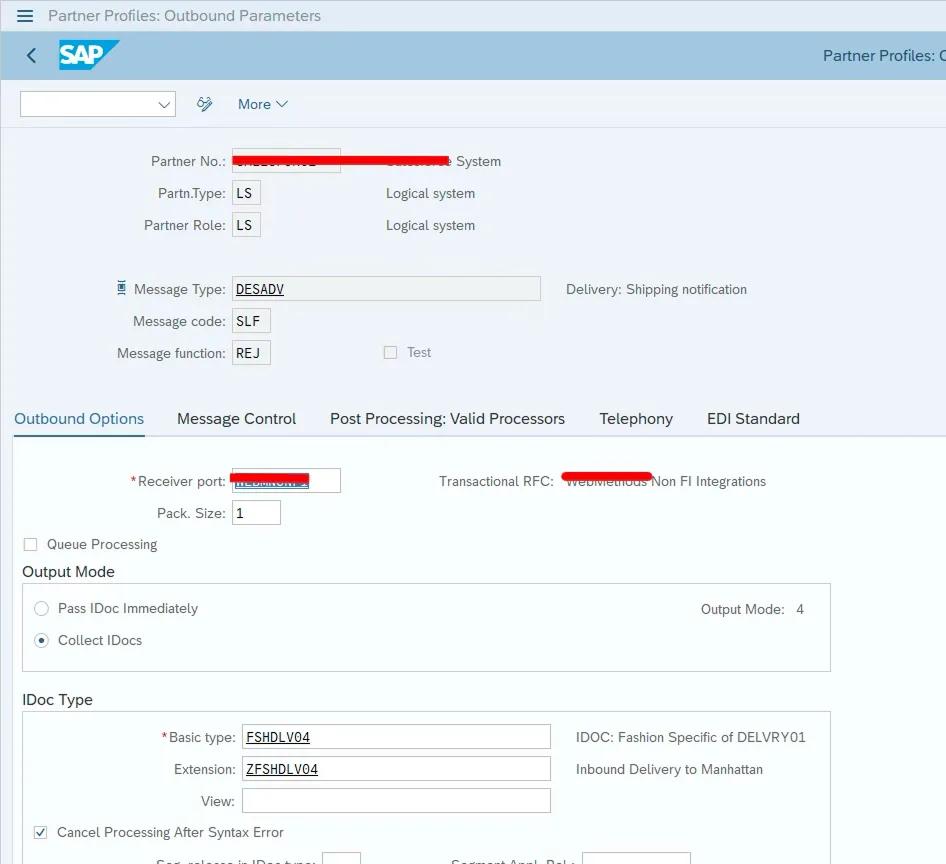
Start by configuring the partner profile for outbound delivery IDOC processing.
Go to WE20
Select or create the partner
Maintain outbound parameters
Assign message type and process code
This step ensures the IDOC is triggered correctly during delivery output.
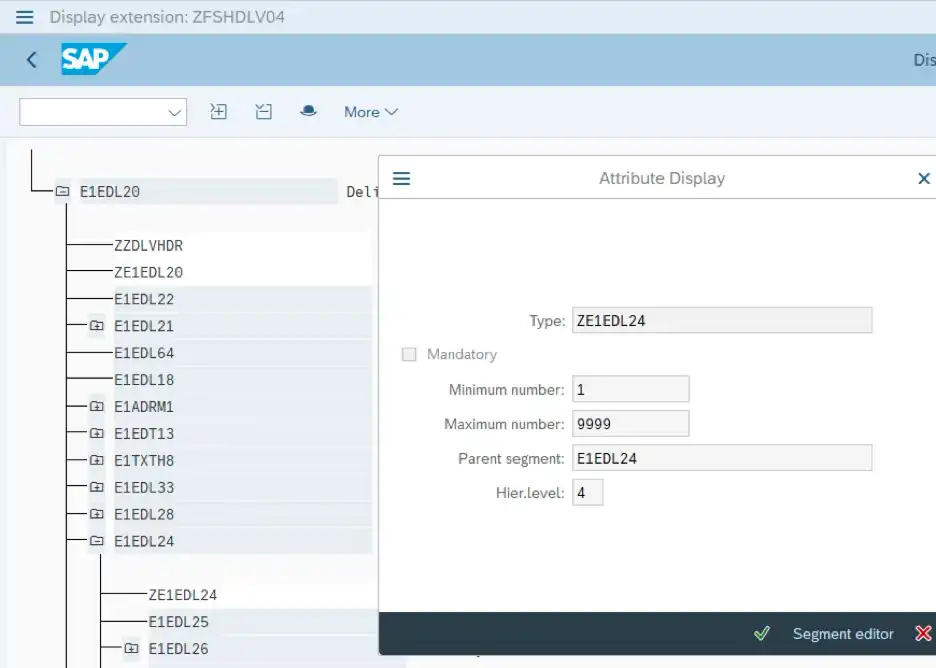
To include custom fields, you need to create a custom segment and extend the IDOC.
Use WE31 to create a segment with required fields
Use WE30 to create an extension
Attach the custom segment to the relevant parent segment
đź’ˇ If you’re not familiar with segment/field creation, you can refer to your article on receiving sales orders with IDOCs for a similar structure approach.
To populate custom fields, use the standard function module:
IDOC FM: IDOC_OUTPUT_DELVRY
User Exit: EXIT_SAPLV56K_002
Include: ZXTRKU02
This is where the custom logic will be written.
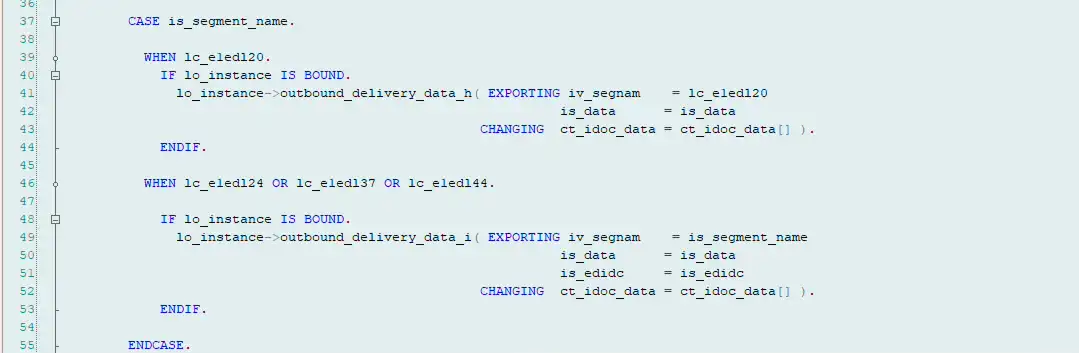
Inside the user exit, identify the segment and populate your custom data.
You will typically handle segments like:
E1EDL20 (Header)
E1EDL24 (Item)
CASE is_segment_name.
WHEN lc_e1edl20.
IF lo_instance IS BOUND.
lo_instance->outbound_delivery_data_h(
EXPORTING
iv_segnam = lc_e1edl20
is_data = is_data
CHANGING
ct_idoc_data = ct_idoc_data[] ).
ENDIF.
WHEN lc_e1edl24.
ls_idoc_data = ct_idoc_data[ lv_count ].
ls_e1edl24 = ls_idoc_data-sdata.
SELECT SINGLE menge meins
FROM zptp_t_mat_alias
INTO (@lv_menge, @lv_meins)
WHERE matnr = @ls_e1edl24-matnr.
IF sy-subrc = 0 AND ls_e1edl24-lfimg NE 0.
ls_e1edl24-lfimg = ls_e1edl24-lfimg * lv_menge.
ls_e1edl24-lgmng = ls_e1edl24-lgmng * lv_menge.
ls_e1edl24-vrkme = lv_meins.
ls_e1edl24-meins = lv_meins.
ENDIF.
ls_idoc_data-sdata = ls_e1edl24.
MODIFY ct_idoc_data FROM ls_idoc_data INDEX lv_count.
ENDCASE.
Once development is complete:
Activate all objects
Trigger delivery output (VL02N / VL03N)
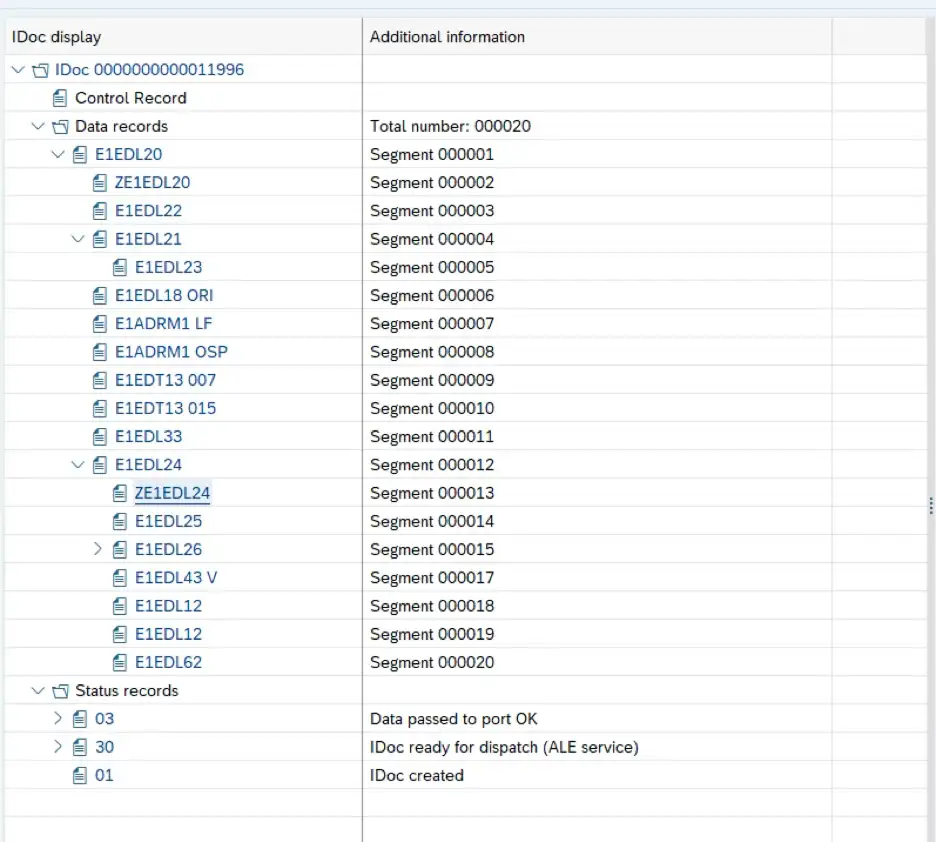
Monitor IDOC in WE02 / WE05
Verify that your custom segment and fields are populated correctly.
Check:
Custom segment appears in IDOC
Field values are correctly populated
Data is received in target system
Forgetting to assign the extension to message type
Incorrect segment hierarchy
Not activating the enhancement
Data not mapped properly inside the exit
1. Can we add multiple custom segments in delivery IDOC?
Yes, multiple custom segments can be added based on business requirements.
2. Which user exit is used for delivery IDOC enhancement?
EXIT_SAPLV56K_002 is commonly used to populate custom fields.
3. How to check if custom fields are populated?
You can verify it in WE02 or WE05 by inspecting the generated IDOC.
Enhancing delivery IDOCs is a powerful way to meet real-world integration needs. With the right approach, you can extend standard SAP functionality without modifying core logic.
Once you understand the pattern—segment creation, enhancement, and data population—you can reuse the same concept across multiple IDOC scenarios.
If you are working with outbound processes, you might also find Send Sales Orders Confirmation with IDOC Extension useful for comparison.

SAP Solution Architect | 16+ Years’ Experience in SAP | Sharing Practical SAP Knowledge | Engineering Graduate with Expertise in SAP Architecture
SAP Solution Architect | 16+ Years' Experience in SAP | Sharing Practical SAP Knowledge | Engineering Graduate with Expertise in SAP Architecture
https://fiowelt.com