• March 25, 2026
  • Kishore Thutaram
  • 0

Introduction

In many SAP integration scenarios, it’s important to notify external systems when a sales order item is rejected. Standard IDOCs do not always filter or send only rejected items, which can lead to unnecessary data transfer and confusion in downstream systems.

This article explains how to send only rejected sales order items using IDOC by implementing output control and enhancements in SAP.

Send rejected sales order items using IDOC in SAP

Business Scenario

A business needs to send only rejected sales order items to an external system in real time for accurate order processing and exception handling.

Solution Overview

To achieve this requirement, we:

  • Trigger output only when an item is rejected
  • Filter rejected items dynamically
  • Enhance the IDOC to send only relevant data
  • Use change pointers to capture delta changes

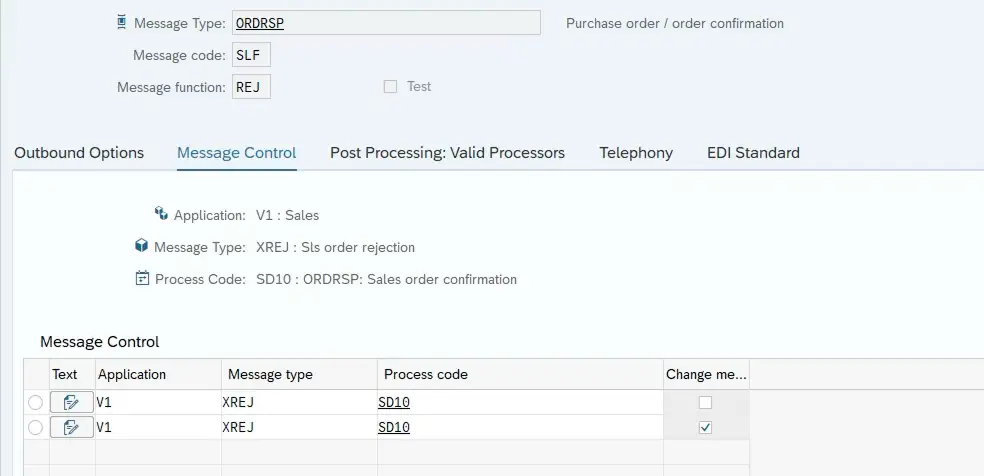
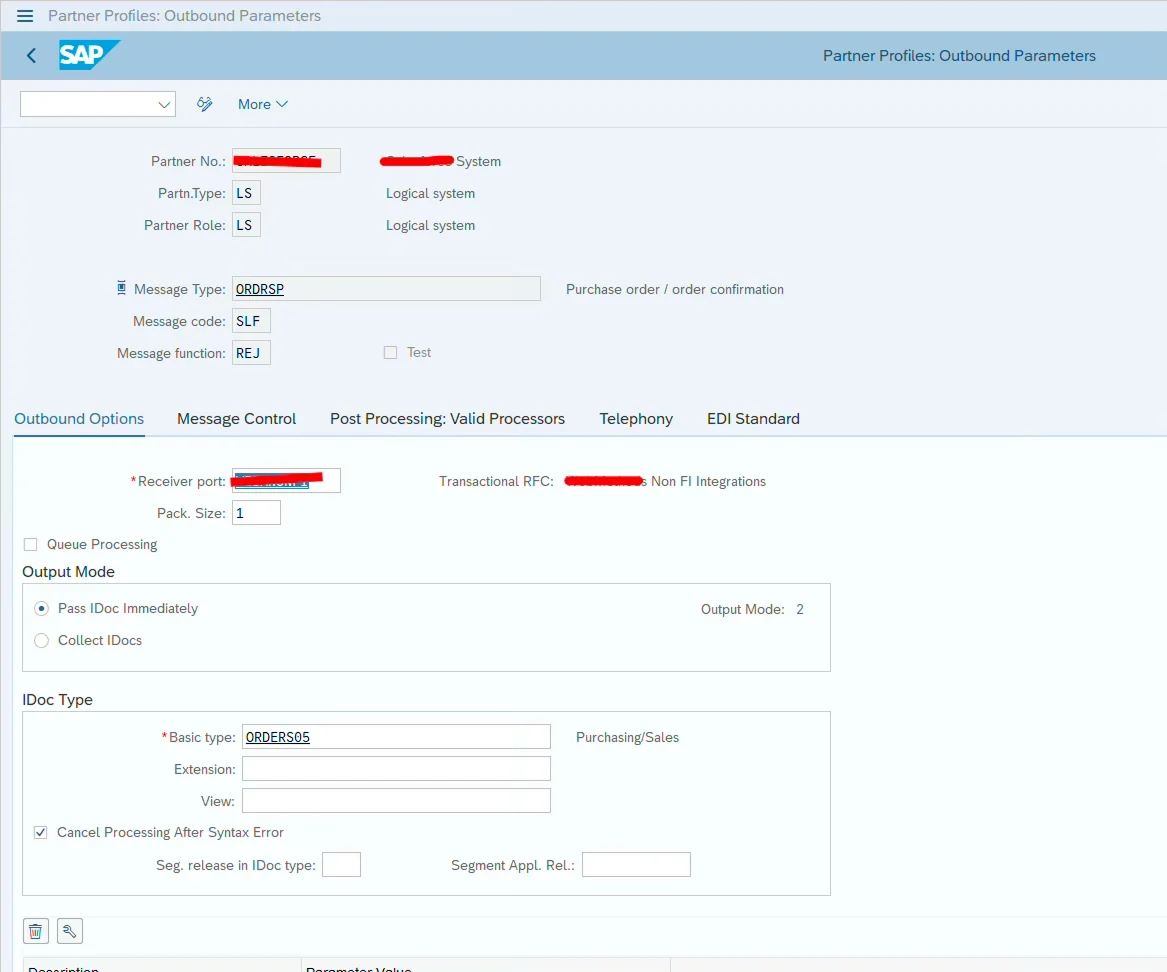
Step 1: Maintain Partner Profile (WE20)

  • Go to WE20
  • Configure outbound parameters
  • Assign message type (e.g., ORDRSP)
  • Maintain process code

This ensures IDOC communication is properly configured.

screenshot1
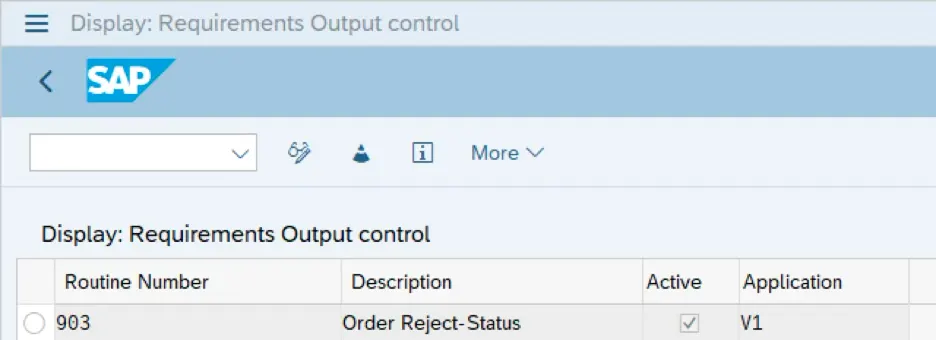
screenshot2

Step 2: Trigger Output Based on Item Rejection

To send IDOC only when rejection happens:

  • Go to VOFM → Requirements → Output Control
  • Create a custom routine (e.g., 903)
  • Assign it to output determination procedure

Sample Logic for Rejection Check

FORM KOBEV_903.

FIELD-SYMBOLS : <lft_yvbap> TYPE tab_xyvbap,
<lft_xvbap> TYPE tab_xyvbap.

DATA: lv_subrc TYPE sy-subrc.

lv_subrc = 4.

ASSIGN ('(SAPMV45A)YVBAP[]') TO <lft_yvbap>.
ASSIGN ('(SAPMV45A)XVBAP[]') TO <lft_xvbap>.

LOOP AT <lft_xvbap> ASSIGNING FIELD-SYMBOL(<lfs_xvbap>)
WHERE abgru IS NOT INITIAL.

IF <lft_yvbap> IS ASSIGNED AND <lft_yvbap> IS NOT INITIAL.
DATA(ls_yvbap) = VALUE #( <lft_yvbap>[ posnr = <lfs_xvbap>-posnr ] OPTIONAL ).

IF ls_yvbap-abgru NE <lfs_xvbap>-abgru.
lv_subrc = 0.
EXIT.
ENDIF.
ENDIF.

ENDLOOP.

sy-subrc = lv_subrc.

ENDFORM.

Step 3: Filter Only Rejected Items in IDOC

To ensure only rejected items are sent, implement logic in IDOC enhancement.

Enhancement Details:

  • Function Module: IDOC processing FM
  • Exit Name: EXIT_SAPLVEDC_001
  • Include: ZXVEDU01

Step 4: Implement Logic Using Change Pointers

This logic ensures only latest rejected items are sent:

DATA: lv_time TYPE sy-uzeit.

IF edidd[] IS NOT INITIAL.
RETURN.
ENDIF.

IF dxvbap IS NOT INITIAL.

lv_time = sy-uzeit - 10.

SELECT tabname tabkey
FROM cdhdr
INNER JOIN cdpos
ON cdhdr~objectclas = cdpos~objectclas
AND cdhdr~objectid = cdpos~objectid
AND cdhdr~changenr = cdpos~changenr
INTO TABLE @DATA(lt_cdpos)
WHERE tabname = 'VBAP'
AND fname = 'ABGRU'
AND udate = @sy-datum
AND utime GT @lv_time.

LOOP AT dxvbap INTO DATA(ls_dxvbap).

DATA(lv_tabkey) = sy-mandt && ls_dxvbap-vbeln && ls_dxvbap-posnr.

READ TABLE lt_cdpos WITH KEY tabkey = lv_tabkey TRANSPORTING NO FIELDS.

IF sy-subrc NE 0.
DELETE ct_dxvbap WHERE vbeln = ls_dxvbap-vbeln
AND posnr = ls_dxvbap-posnr.
ENDIF.

ENDLOOP.

ENDIF.

Step 5: Test the IDOC

  • Trigger sales order change (VA02)
  • Reject an item
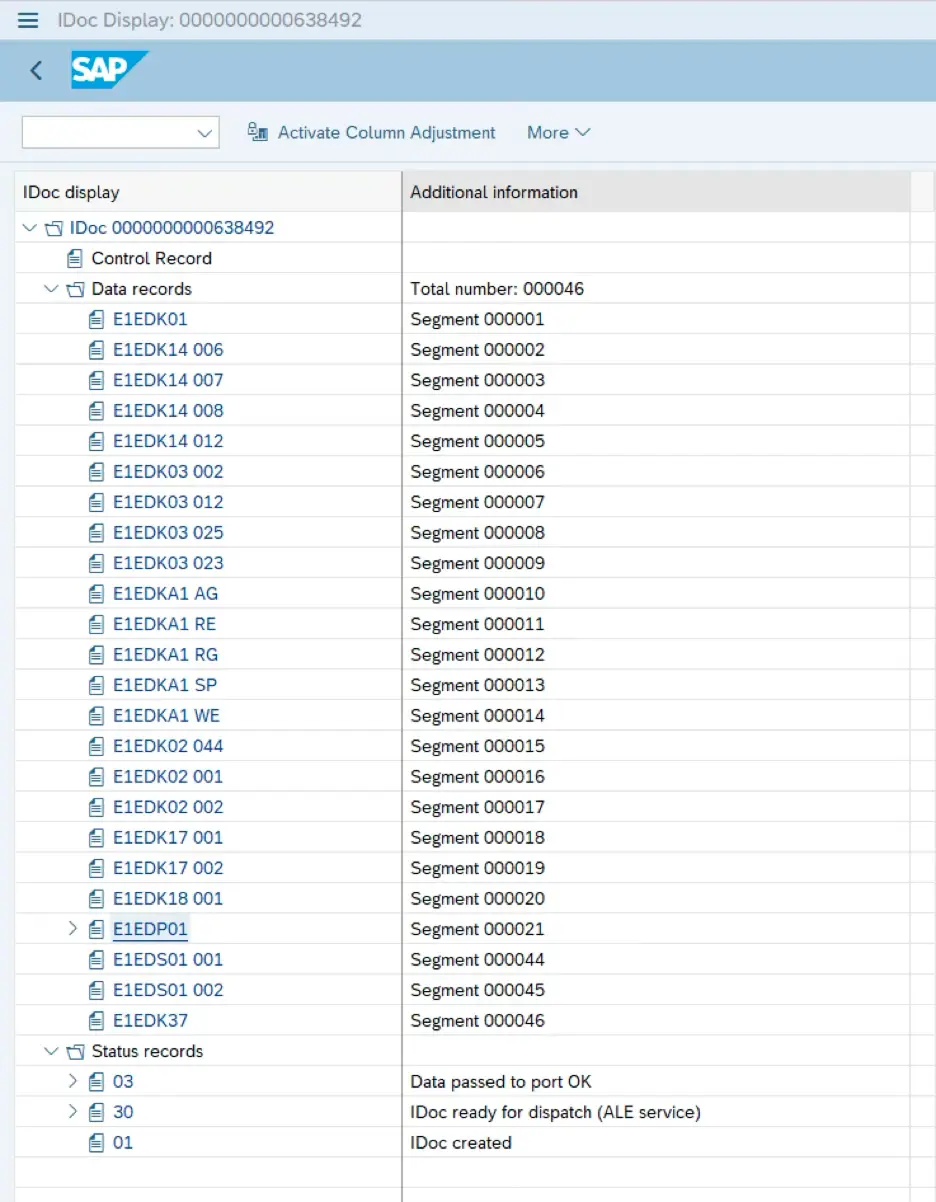
  • Check IDOC in WE02 / WE05

Verify that:

  • Only rejected items are sent
  • No unnecessary items are included

Step 6: Key Benefits

  • Reduces unnecessary data transfer
  • Improves integration efficiency
  • Ensures accurate rejection handling
  • Enables real-time communication

Step 7: Validate Output

After triggering the IDOC, verify the following:

  • IDOC is successfully generated in WE02 / WE05
  • Only rejected items (with ABGRU field) are present
  • No non-rejected items are included
  • Correct item numbers and rejection reasons are sent
  • Data is correctly received in the target system

Common Mistakes to Avoid

❌ Not assigning the output determination routine in configuration

❌ Incorrect logic while comparing XVBAP and YVBAP tables

❌ Forgetting to filter non-rejected items in IDOC enhancement

❌ Not using change pointers, leading to duplicate or unnecessary data

❌ Missing partner profile configuration in WE20

Frequently Asked Questions

1. How do we trigger IDOC only for rejected items?
By implementing a custom output control routine in VOFM.

2. Which field indicates rejection in sales order?
Field ABGRU (Reason for Rejection).

3. Why use change pointers in this scenario?
To capture only recent changes and avoid sending duplicate data.

4. Can this be extended for other conditions?
Yes, similar logic can be applied for delivery blocks, pricing changes, etc.

🎉 Final Thoughts

Sending only rejected sales order items via IDOC is a smart way to optimize integrations and reduce unnecessary data exchange. By combining output control, enhancement logic, and change pointer techniques, you can ensure that only relevant data is sent to external systems.

Once implemented correctly, this approach improves performance, accuracy, and overall integration efficiency in SAP landscapes.

Share article

Kishore Thutaram

SAP Solution Architect | 16+ Years' Experience in SAP | Sharing Practical SAP Knowledge | Engineering Graduate with Expertise in SAP Architecture

https://fiowelt.com

Leave a Reply

Your email address will not be published. Required fields are marked *