

- February 19, 2026
- Kishore Thutaram
- 0
Introduction
In SAP S/4HANA, updating custom fields in Purchase Orders traditionally required BAPIs, enhancements, or direct table updates. But with RAP (RESTful ABAP Programming Model) and EML (Entity Manipulation Language), the process becomes much cleaner, upgrade-safe, and aligned with modern SAP architecture.
In this article, we will see the simplest and recommended method to update Purchase Order custom field values using RAP EML — without using BAPI.

Business Scenario
You have created a custom field for Purchase Order (Header or Item level), and you need to update that field programmatically during processing (for example during PO change, enhancement, or custom logic execution).
Instead of using traditional BAPI methods, we will use RAP EML.
Step 1: Extend Custom Field to Standard CDS BO Interface
Open CFL App
Search for the custom field, which is already created. Need help? “Refer the other article, Create Custom field in SAP S/4 HANA using CFL Fiori app”.
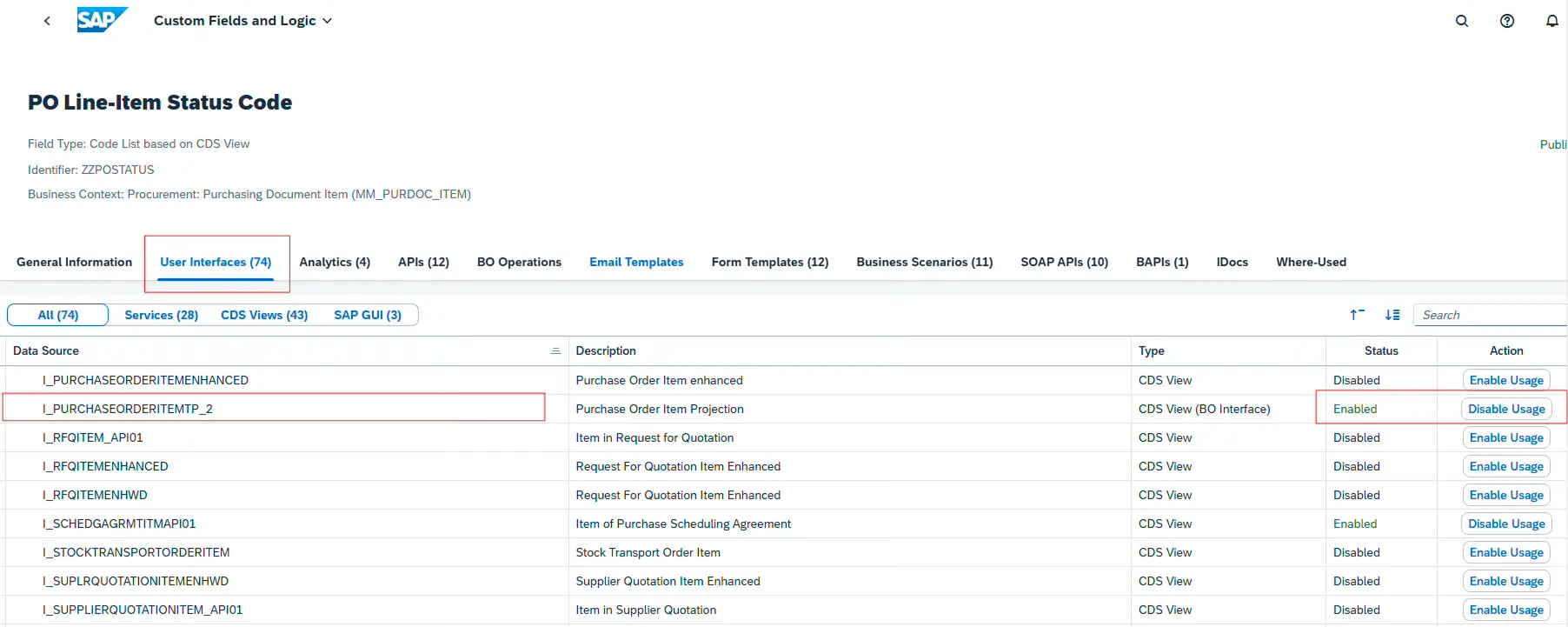
Go to User Interfaces and select corresponding CDS BO.
Example: if the field is at Purchase order Item – choose i_purchaseorderitemtp_2
Click on Enable Usage – > Publish
You can transport the change by using the Fiori app, “Register Extensions for Transport”
Need help? “Refer the other article, Create Custom field in SAP S/4 HANA using CFL Fiori app”.
CFL -> Search for custom field

In this case, the field extension is for Purchase order item.
Select the field -> User Interface -> All
CDS BO: i_purchaseorderitemtp_2
Step 2: Implement EML in ABAP to Update Custom Field
Now implement EML in your ABAP program/class/FM/Exit.
Below is the exact structure based on your document.
Prepare Update Table
DATA : lt_update TYPE TABLE FOR UPDATE i_purchaseorderitemtp_2,
       ls_update LIKE LINE OF lt_update
Build Update Logic
Loop through internal table and prepare update structure:
LOOP AT xekpo INTO DATA(ls_xekpo).
ls_update = VALUE #(
purchaseorder = ls_xekpo-ebeln
purchaseorderitem = ls_xekpo-ebelp
zzpostatus_pdi = lc_status
%control-zzpostatus_pdi = if_abap_behv=>mk-on
%control-zzcexfd_pdi = if_abap_behv=>mk-on ).
APPEND ls_update TO lt_update.
ENDLOOP.
Execute EML Update
IF lt_update IS NOT INITIAL.
MODIFY ENTITIES OF i_purchaseordertp_2
ENTITY purchaseorderitem
UPDATE FROM lt_update
FAILED DATA(lt_failed)
REPORTED DATA(lt_reported)
MAPPED DATA(lt_mapped).

IF sy-subrc EQ 0 AND lt_failed IS INITIAL.
COMMIT ENTITIES.
ELSE.
ROLLBACK ENTITIES.
ENDIF.
ENDIF.
Build Log from Reported Messages
Use lt_reported to capture success/error messages and build log
Build Log from Reported Messages
Step 3: Why Use RAP EML Instead of BAPI?
Clean architecture
Upgrade-safe
Standard BO-based update
No direct table manipulation
Modern SAP S/4HANA compliant
If you’re still using traditional methods, you may also check:
👉 Update Sales Order Custom Fields using BAPI_SALESORDER_CHANGE
Step 4: Complete Code
DATA : lt_update TYPE TABLE FOR UPDATE i_purchaseorderitemtp_2,
ls_update LIKE LINE OF lt_update.
–*Update EKPO Custom Fields, zzpostatus_pdi
*–*EML Syntax to update EKPO Custom Fields
LOOP AT xekpo INTO DATA(ls_xekpo).
ls_update = VALUE #( purchaseorder = ls_xekpo-ebeln
purchaseorderitem = ls_xekpo-ebelp
zzpostatus_pdi = lc_status
%control-zzpostatus_pdi = if_abap_behv=>mk-on
%control-zzcexfd_pdi = if_abap_behv=>mk-on ).
APPEND ls_update TO lt_update.
ENDLOOP.
IF lt_update IS NOT INITIAL.
MODIFY ENTITIES OF i_purchaseordertp_2
ENTITY purchaseorderitem
UPDATE FROM lt_update FAILED DATA(lt_failed) REPORTED DATA
(lt_reported) MAPPED DATA(lt_mapped).
IF sy-subrc EQ 0 AND lt_failed IS INITIAL.
COMMIT ENTITIES.
IF sy-subrc EQ 0.
* Do nothing
ENDIF.
ELSE.
ROLLBACK ENTITIES.
ENDIF.
ENDIF.
*–*Build the Log after Update
LOOP AT lt_reported-purchaseorder ASSIGNING FIELD-SYMBOL(<lfs_reported>). “#EC CI_NESTED
ASSIGN COMPONENT ‘%msg’ OF STRUCTURE <lfs_reported> TO <lfs_message>.
ASSERT sy-subrc = 0.
CASE <lfs_message>->m_severity.
WHEN if_abap_behv_message=>severity-none.
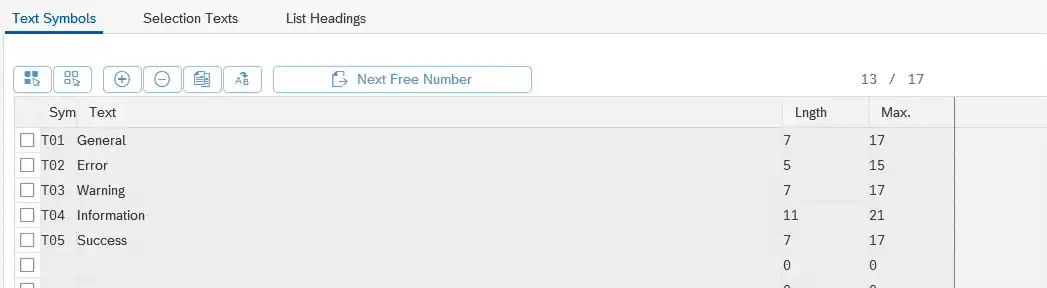
lv_severity = TEXT-t01.
WHEN if_abap_behv_message=>severity-error.
lv_severity = TEXT-t02 .
DATA(lv_msgtyp) = gc_error.
WHEN if_abap_behv_message=>severity-warning.
lv_severity = TEXT-t03.
WHEN if_abap_behv_message=>severity-information.
lv_severity = TEXT-t04.
WHEN if_abap_behv_message=>severity-success.
lv_severity = TEXT-t05.
ENDCASE.
DATA(lv_text) = <lfs_message>->if_message~get_text( ).
IF lv_message IS NOT INITIAL.
lv_message = |{ lv_message }\n|.
ENDIF.
lv_message = |{ lv_message }{ lv_severity } { <lfs_message>->if_t100_message~t100key-msgid } { <lfs_message>->if_t100_message~t100key-msgno }: { lv_text }|.
Common Mistakes Developers Make
❌ Not enabling the custom field for CDS BO before EML
❌ Forgetting %control-fieldname = if_abap_behv=>mk-on
❌ Using wrong CDS interface (header vs item confusion)
❌ Missing COMMIT ENTITIES
❌ Ignoring lt_failed handling
Frequently Asked Questions
Can I update Purchase Order header fields using EML?
Yes, you must use the corresponding header CDS interface like i_purchaseordertp_2.
Is COMMIT WORK enough after MODIFY ENTITIES?
No, you must use COMMIT ENTITIES.
Can I use EML in User Exits or BAdIs?
Yes, as long as you are in a suitable update context.
🎉 Final Thoughts
RAP EML is the recommended and future-proof way to update Purchase Order custom fields in SAP S/4HANA. It eliminates dependency on legacy BAPIs and aligns your development with SAP’s modern programming model. If you’re working in S/4HANA, moving to EML is not optional — it’s the right direction.

“SAP solution architect with a strong problem-solving mindset, sharing practical SAP S/4HANA and ABAP insights from real-world projects.”








