

- February 18, 2026
- Kishore Thutaram
- 0
Introduction
Still using BAPI to update custom fields in Sales Orders?
Simplest method to update the custom field values in S/4 HANA system, no need to use BAPI anymore.
In S/4HANA, there’s a cleaner and more modern way — RAP EML (Entity Manipulation Language).
With EML, you can directly update standard business objects like Sales Orders without calling classical BAPIs. The process is cleaner, more controlled, and aligned with S/4HANA architecture.
In this article, we will update Sales Order custom field values using RAP EML step by step.

Business Scenario
Update Sales Order custom field values programmatically in S/4HANA without using BAPI_SALESORDER_CHANGE.
The solution should:
Use RAP BO interface
Update header or item custom fields
Handle commit and rollback properly
Capture success and error messages
Step 1: Extend the custom fields to the standard CDS BO Interface: using the CFL (Custom Fields Logic) Fiori App:
Open CFL App
Search for the custom field, which is already created. Need help? “Refer the other article, Create Custom field in SAP S/4 HANA using CFL Fiori app”.
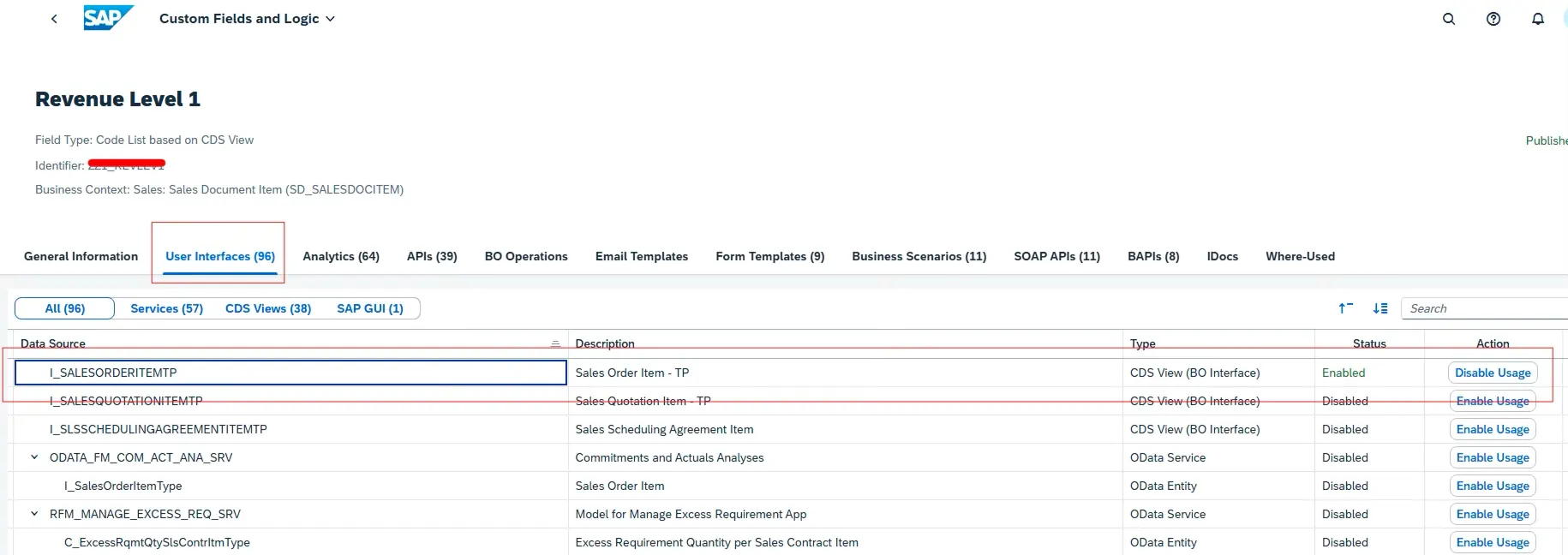
Go to User Interfaces and select corresponding CDS BO.
Example: if the field is at sales order header – choose I_SALESORDERTP
For the Item level field – choose I_SALESORDERITEMTP
Click on Enable Usage – > Publish
You can transport the change by using the Fiori app, “Register Extensions for Transport”
Need help? “Refer the other article, Create Custom field in SAP S/4 HANA using CFL Fiori app”

In this case, the field extension is for sales order item.
Select the field -> User Interface -> All
CDS BO: I_SALESORDERITEMTP
Step 2: Implement EML Logic in ABAP
Now implement RAP EML in your program/class/FM/exit.
First, declare update structures:
DATA : lt_update TYPE TABLE FOR UPDATE i_salesorderitemtp,

       ls_update LIKE LINE OF lt_update.
Loop through your internal table containing data to update:
LOOP AT gt_final INTO DATA(ls_final).
Map:
Sales Order → vbeln
Sales Order Item → posnr
Custom fields → zz1_* fields
Important part:
Set control structure flag:
ls_update-%control-zz1_revlev1 = if_abap_behv=>mk-on.
Without this, the custom field will not update.
Step 3: Use EML Syntax to Update Sales Order
Now use EML syntax:
MODIFY ENTITIES OF i_salesordertp
ENTITY salesorderitem
UPDATE FROM lt_update
FAILED DATA(lt_failed)
REPORTED DATA(lt_reported)
MAPPED DATA(lt_mapped).
This replaces traditional BAPI usage.
If update is successful:
COMMIT ENTITIES.
If errors occur:
ROLLBACK ENTITIES.
This ensures proper transaction handling.
Step 4: Handle EML Messages Properly
After execution, process reported messages:
LOOP AT lt_reported-salesorder ASSIGNING FIELD-SYMBOL(<lfs_reported>).
Check severity:
Error
Warning
Information
Success
Use:
<lfs_message>->if_message~get_text( )
Build log messages for monitoring.
This ensures transparency and traceability.
Step 5 Complete Code
DATA : lt_update TYPE TABLE FOR UPDATE i_salesorderitemtp,
ls_update LIKE LINE OF lt_update.
“gt_final contains the data to update sales order item tables
LOOP AT gt_final INTO DATA(ls_final).
ls_update-salesorder = ls_final-vbeln.
ls_update-salesorderitem = ls_final-posnr.
IF ls_final-revlev1 IS NOT INITIAL.
ls_update-zz1_revlev1 = ls_final-revlev1.
ls_update-%control-zz1_revlev1 = if_abap_behv=>mk-on.
ENDIF.
IF ls_final-revlev2 IS NOT INITIAL.
ls_update-zz1_revlev2 = ls_final-revlev2.
ls_update-%control-zz1_revlev2 = if_abap_behv=>mk-on.
ENDIF.
APPEND ls_update TO lt_update.
CLEAR ls_update.
AT END OF vbeln.
IF lt_update IS NOT INITIAL.
*–*EML Syntax to update VBAP Custom Fields
MODIFY ENTITIES OF i_salesordertp ##EML_IN_LOOP_OK
ENTITY salesorderitem
UPDATE FROM lt_update FAILED DATA(lt_failed) REPORTED DATA(lt_reported) MAPPED DATA(lt_mapped).
IF sy-subrc EQ 0 AND lt_failed IS INITIAL.
COMMIT ENTITIES.
IF sy-subrc EQ 0.
DATA(lv_success) = abap_true.
ENDIF.
ELSE.
ROLLBACK ENTITIES. “#EC CI_ROLLBACK
ENDIF.
*–*Build the Log after Update
LOOP AT lt_reported-salesorder ASSIGNING FIELD-SYMBOL(<lfs_reported>). “#EC CI_NESTED
ASSIGN COMPONENT ‘%msg’ OF STRUCTURE <lfs_reported> TO <lfs_message>.
ASSERT sy-subrc = 0.
CASE <lfs_message>->m_severity.
WHEN if_abap_behv_message=>severity-none.
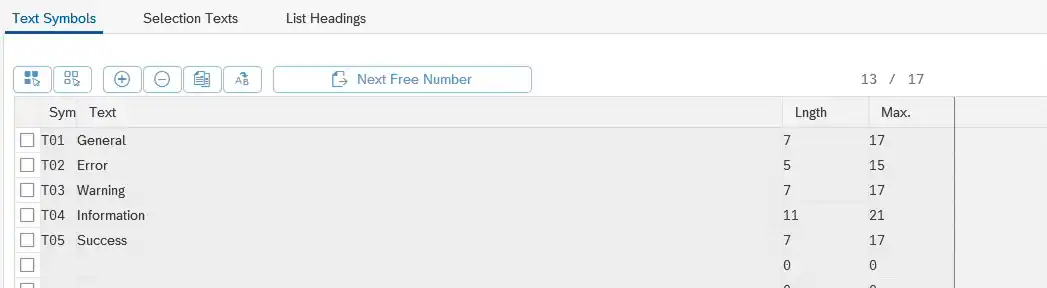
lv_severity = TEXT-t01.
WHEN if_abap_behv_message=>severity-error.
lv_severity = TEXT-t02 .
DATA(lv_msgtyp) = gc_error.
WHEN if_abap_behv_message=>severity-warning.
lv_severity = TEXT-t03.
WHEN if_abap_behv_message=>severity-information.
lv_severity = TEXT-t04.
WHEN if_abap_behv_message=>severity-success.
lv_severity = TEXT-t05.
ENDCASE.
DATA(lv_text) = <lfs_message>->if_message~get_text( ).
IF lv_message IS NOT INITIAL.
lv_message = |{ lv_message }\n|.
ENDIF.
lv_message = |{ lv_message }{ lv_severity } { <lfs_message>->if_t100_message~t100key-msgid } { <lfs_message>->if_t100_message~t100key-msgno }: { lv_text }|.
ENDLOOP.
Step 6: Final Output
When executed:
Sales Order item custom fields are updated
No BAPI is required
RAP framework handles consistency
Messages are captured properly
This is the recommended S/4HANA-compliant way of updating Sales Order custom fields.
Common Mistakes Developers Make
❌ Forgetting to enable custom field usage in CDS BO
❌ Not setting %control-fieldname = if_abap_behv=>mk-on
❌ Missing COMMIT ENTITIES
❌ Updating wrong CDS interface (header vs item)
❌ Ignoring FAILED and REPORTED structures
Frequently Asked Questions
Is RAP EML replacing BAPI_SALESORDER_CHANGE?
Yes, RAP EML is the modern S/4HANA-compliant way to update business objects without classical BAPIs.
Why is %control-field mandatory in EML?
Because RAP updates only fields explicitly marked using the control structure.
Can I update header-level fields using EML?
Yes, by using the correct CDS BO interface such as I_SALESORDERTP for header fields.
🎉 Final Thoughts
RAP EML is not just a new syntax — it is the future direction of S/4HANA development.
Instead of relying on classical BAPIs, you now update business objects in a structured, framework-driven way. Once implemented correctly, the logic becomes cleaner, safer, and easier to extend.
If you’re moving toward RAP-based development, this approach should become your standard practice.

“SAP solution architect with a strong problem-solving mindset, sharing practical SAP S/4HANA and ABAP insights from real-world projects.”








