- September 26, 2026
- Kishore Thutaram
- 0
Introduction
Testing OData services is an important part of SAP Gateway and SAP Fiori development. Before consuming an OData service from a Fiori application, developers often need to verify whether the service correctly handles requests and returns the expected data.
SAP provides the Gateway Client transaction /IWFND/GW_CLIENT, which allows developers to test OData V2 services directly from the SAP system without requiring a Fiori application.
In this article, we will see how to test common OData operations such as Read, Filter, Create Deep Entity, and Expand using the SAP Gateway Client.

Business Scenario
During SAP Fiori development, an OData service may return unexpected data, fail to create records, or produce incorrect navigation results.
Instead of debugging the Fiori application first, developers can test the OData service directly using /IWFND/GW_CLIENT. This helps determine whether the issue is in the OData service itself or in the frontend application consuming it.
Solution Overview
The SAP Gateway Client provides a convenient way to send HTTP requests directly against an OData V2 service.
Using /IWFND/GW_CLIENT, we can test:
- Get Entity – retrieve a single record
- Get Entity Set – retrieve multiple records with filters
- Create Deep Entity – create header and child data
- Get Expand – retrieve related child entities
The following sections explain each operation with the corresponding request structure.
Step 1: Open SAP Gateway Client
Use the following transaction:
/IWFND/GW_CLIENT
The SAP Gateway Client opens an interface where you can enter the OData service URL and execute different HTTP operations.
The document specifically identifies /IWFND/GW_CLIENT as the transaction for testing OData V2 services.
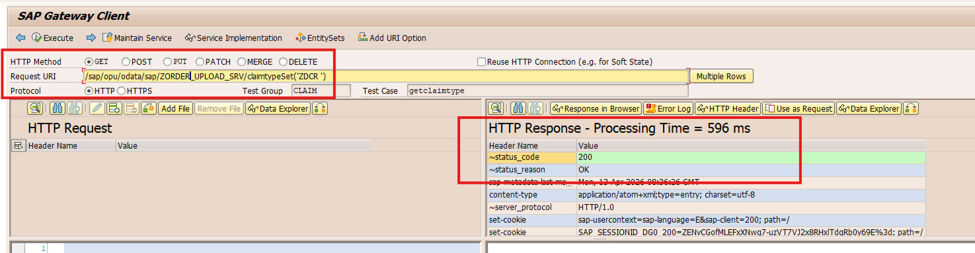
Step 2: Read/Get Call – Single Record Fetch – Get Entity Method Test
The Get Entity method is used when we need to fetch a single record from an OData service using its key.
Step 1: Execute Get Entity
Enter the OData service URL in the SAP Gateway Client and select the GET operation.
Click the Entity Set button and select the required entity set. Provide the required key value and execute the request.
Steps
- Open transaction
/IWFND/GW_CLIENT. - Enter the OData service URL.
- Select the GET method.
- Click Entity Set.
- Select the required entity set.
- Enter the required key value.
- Execute the request.
- Check the response returned by the service.
The Get Entity method is used for a single-record fetch.
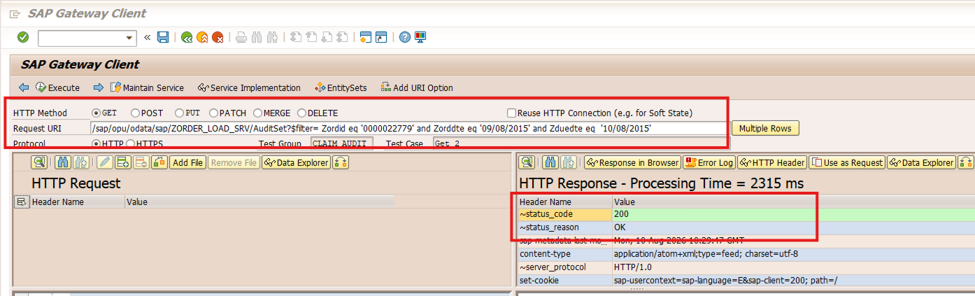
Step 3: Read/Get Call with Filter – Multiple Records – Get Entity Set Method Test
The Get Entity Set method is used when multiple records need to be retrieved from the OData service.
A filter can be added to restrict the records returned by the service.
Step 2: Execute Get Entity Set with Filter
Enter the OData service URL and select the GET method.
Select the required Entity Set and provide the required filter condition.
The document uses the following filter structure:
Servicename/EntitySet?$filter=Field1 eq '0000022779'
and Field2 eq '09/08/2015'
and Field3 eq '10/08/2015'
The actual service name, entity set, fields, and values should be replaced according to your OData service.
Steps
- Enter the OData service URL.
- Select GET.
- Select the required Entity Set.
- Add the required
$filtercondition. - Execute the request.
- Verify the multiple records returned in the response.
Using $filter is useful when the service contains many records but the application requires only records matching specific conditions.
Step 4: Create / POST Operation – Create Deep Entity Method Test
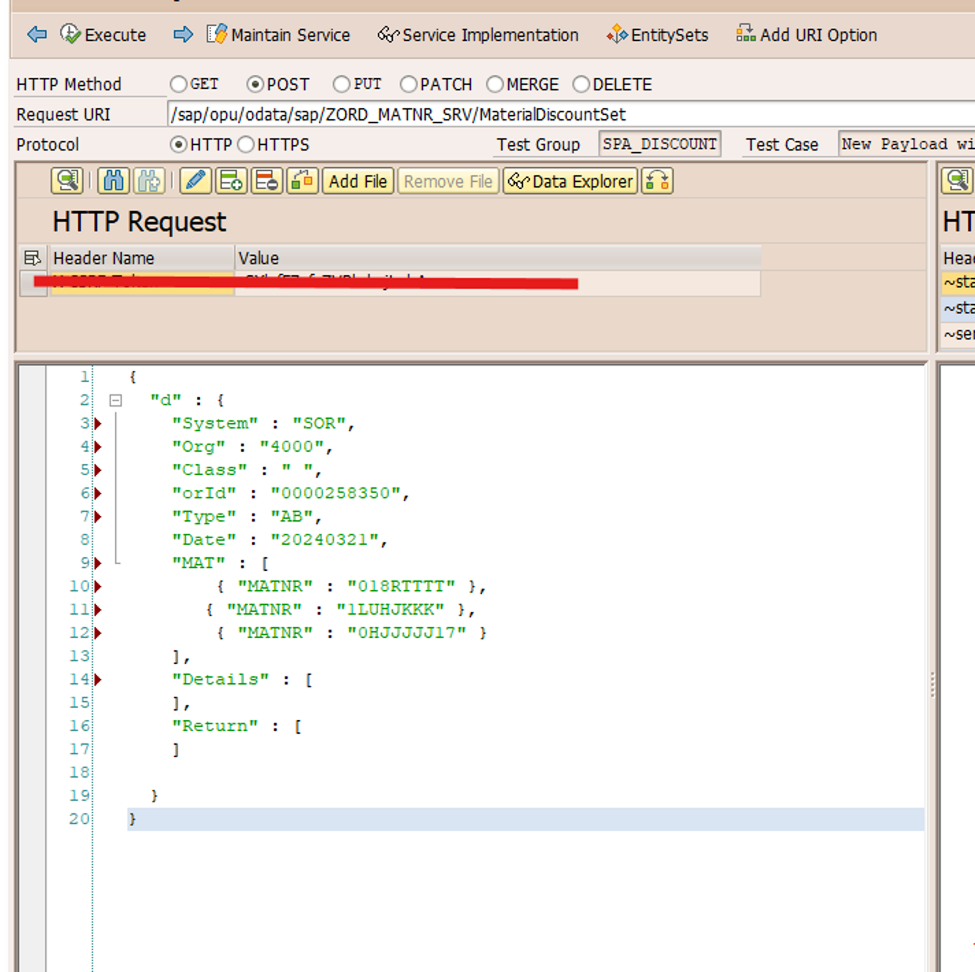
Select the POST operation in SAP Gateway Client and enter the required OData service URL.
The document specifies that the request contains the header details and a navigation property with child parameters.
The request can conceptually contain the following structure:
{
    "Header details": {
    },

    "NavigationProperty": [
        {
            "Child parameters": "Value"
        }
    ]
}
The exact property names depend on the OData service implementation.
Important Points
While testing the Deep Entity request:
- Use the POST method.
- Enter the correct service URL.
- Maintain the required URL extension/header information.
- Provide the header-level information.
- Provide the navigation property.
- Maintain the required child parameters.
- Execute the request and verify the response.
The document specifically notes that the Headerset should be on the URL extension, while the payload contains the header details and navigation property with child parameters.
Step 5: Get Expand – Deep Entity
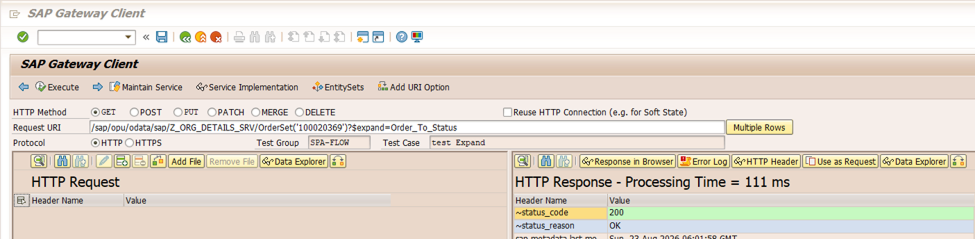
The final scenario covered in this implementation is Get Expand – Deep Entity.
The $expand query option is used to retrieve the main entity together with its related child entity data.
Step 4: Execute Get Expand
The document provides the following URL structure:
Service/EntitySet('Keyvalue')?$expand=childentitysetnameFor example:
Service/EntitySet('Keyvalue')?$expand=ChildEntitySetReplace the placeholders with the actual service, entity set, key value, and child entity set/navigation property from your OData service.
Steps
- Enter the OData service URL.
- Select the GET method.
- Provide the entity set and key value.
- Add the
$expandparameter. - Provide the required child entity set/navigation property.
- Execute the request.
- Verify the response containing the main entity and related child data.
The $expand operation is particularly useful for checking whether the relationship between the parent entity and its child entity has been implemented correctly.
Common Mistakes Developers Make
1. Using the Wrong Entity Set
A frequent mistake is selecting an incorrect Entity Set while testing the service.
Solution: Check the service metadata and select the appropriate Entity Set.
2. Incorrect Key Value
For Get Entity requests, the key value must match the key definition of the Entity Set.
Solution: Verify the key field and provide the correct value.
3. Incorrect Filter Syntax
A wrongly formatted $filter expression can result in an error or unexpected response.
Solution: Check field names, operators, quotes, and data formats before executing the request.
4. Incorrect Navigation Property
Deep Entity and $expand operations depend on the correct navigation property.
Solution: Verify the navigation property name from the OData service metadata.
5. Incorrect Deep Entity Payload
If the header and child data do not follow the expected structure, the POST request may fail.
Solution: Compare the payload structure with the service’s metadata and Deep Entity implementation.
Frequently Asked Questions
What transaction is used to test OData services?
The SAP Gateway Client transaction /IWFND/GW_CLIENT is used to test OData services.
Can I test a single record using Gateway Client?
Yes. Use the Get Entity method with the appropriate Entity Set and key value.
How can I test multiple records with conditions?
Use Get Entity Set with an OData $filter expression.
Internal Linking
If the OData service works correctly in Gateway Client but the Fiori application still shows unexpected results, you can troubleshoot the frontend and backend flow using our ABAP debugging guide.
For OData services processing large datasets, performance is also important. Our Top ABAP Performance Tuning Techniques article covers practical techniques for reducing database access and improving application performance.
If the OData service is being consumed from a custom SAP UI5 application, you can also refer to our articles covering SAP UI5 development and debugging for frontend troubleshooting.
Final Thoughts
The SAP Gateway Client provides a practical way to test OData V2 services directly from the SAP backend before connecting them to a SAP Fiori or SAP UI5 application.
Using /IWFND/GW_CLIENT, developers can test Get Entity for single-record retrieval, Get Entity Set with filters for multiple records, Create Deep Entity using POST, and Get Expand for related child data.
Testing these scenarios individually helps developers validate the OData service and its request/response behavior before troubleshooting the consuming application.

SAP Solution Architect | 16+ Years’ Experience in SAP | Sharing Practical SAP Knowledge | Engineering Graduate with Expertise in SAP Architecture