• October 8, 2026
  • Kishore Thutaram
  • 0

Introduction

In SAP, business requirements sometimes require additional information to be captured during MIRO invoice verification and carried forward into the corresponding accounting document.

For example, the business may need additional fields such as Partner Profit Center and Trading Partner during MIRO processing. These values may then need to be available in accounting tables such as ACDOCA and BSEG.

In this article, we will see how to add custom fields to MIRO and map their values to the accounting documents using the enhancement and configuration steps described in the implementation.

Add custom fields to MIRO and map them to accounting in SAP

Business Scenario

A company wants to capture Partner Profit Center and Trading Partner information during incoming invoice verification using transaction MIRO.

The requirement is not limited to displaying these fields in MIRO. The values also need to be transferred to the accounting documents so that they are available for further financial processing and reporting.

The implementation therefore needs to address the following:

  • Add the required fields to MIRO.
  • Transfer the values to accounting.
  • Update ACDOCA where required.
  • Map the values to BSEG.
  • Ensure the fields are visible in the MIRO screen

Solution Overview

The solution uses a combination of SAP structures, BAdIs, a BTE, and FIBF configuration.

The implementation follows these main steps:

  1. Add the fields to CI_COBL.
  2. Optionally add the fields to CI_DRSEG_CUST and implement MRM_ITEM_CUSTFIELDS if material-document-level fields are required.
  3. Handle accounting document updates using the relevant S/4HANA behavior or AC_DOCUMENT BAdI.
  4. Map the fields to BSEG using a BTE.
  5. Configure the BTE using FIBF.
  6. Adjust the MIRO field layout using OLMRLIST if the fields are not visible.

The document specifically identifies Partner Profit Center and Trading Partner as the example custom fields for this implementation.

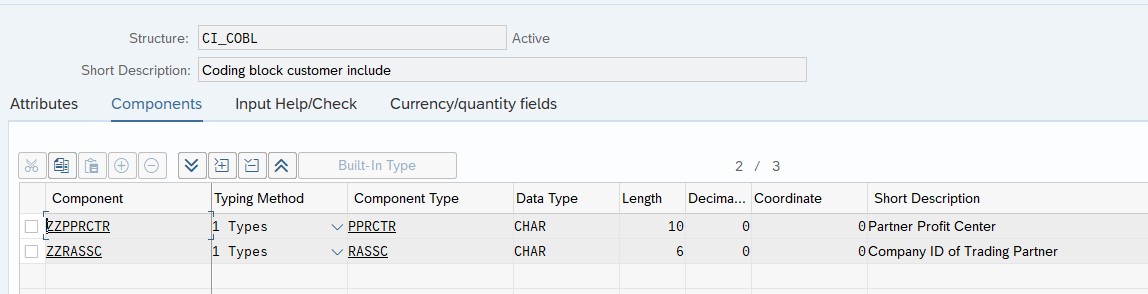
Step 1: Add Custom Fields to CI_COBL

The first step is to add the required custom fields to the structure:

CI_COBL

For this example, the required fields are:

  • Partner Profit Center
  • Trading Partner

Once the fields are added to CI_COBL, SAP adds these fields to the underlying accounting-related tables such as:

ACDOCA

BSEG

and other relevant tables.

This is the starting point for making the additional accounting fields available in the process.

screenshot1

Step 2: Add Fields to Material Document Level

if these fields are needed at material document table level, add these fields to the structure CI_DRSEG_CUST and Implement the BADI – MRM_ITEM_CUSTFIELDS. (this is an optional step; this step is not required if the fields are for accounting).

Step 3: Update Fields in ACDOCA

For an S/4HANA system, SAP updates the fields and their values to the ACDOCA table automatically.

If the system requires the additional implementation described in the document, implement the following BAdI:

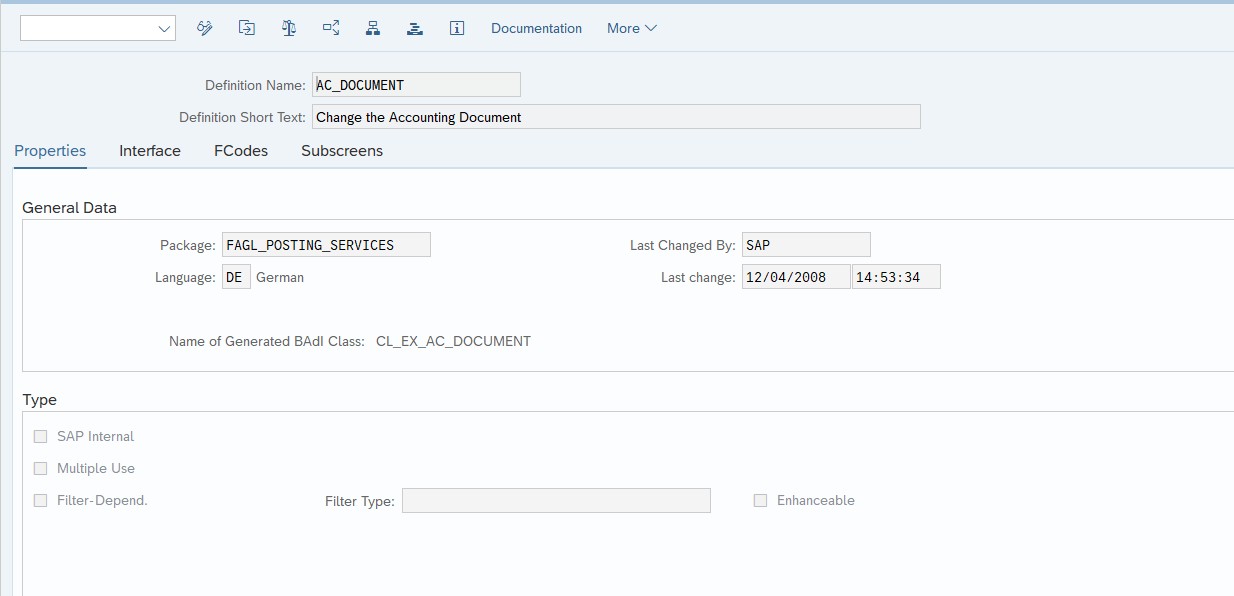
AC_DOCUMENT

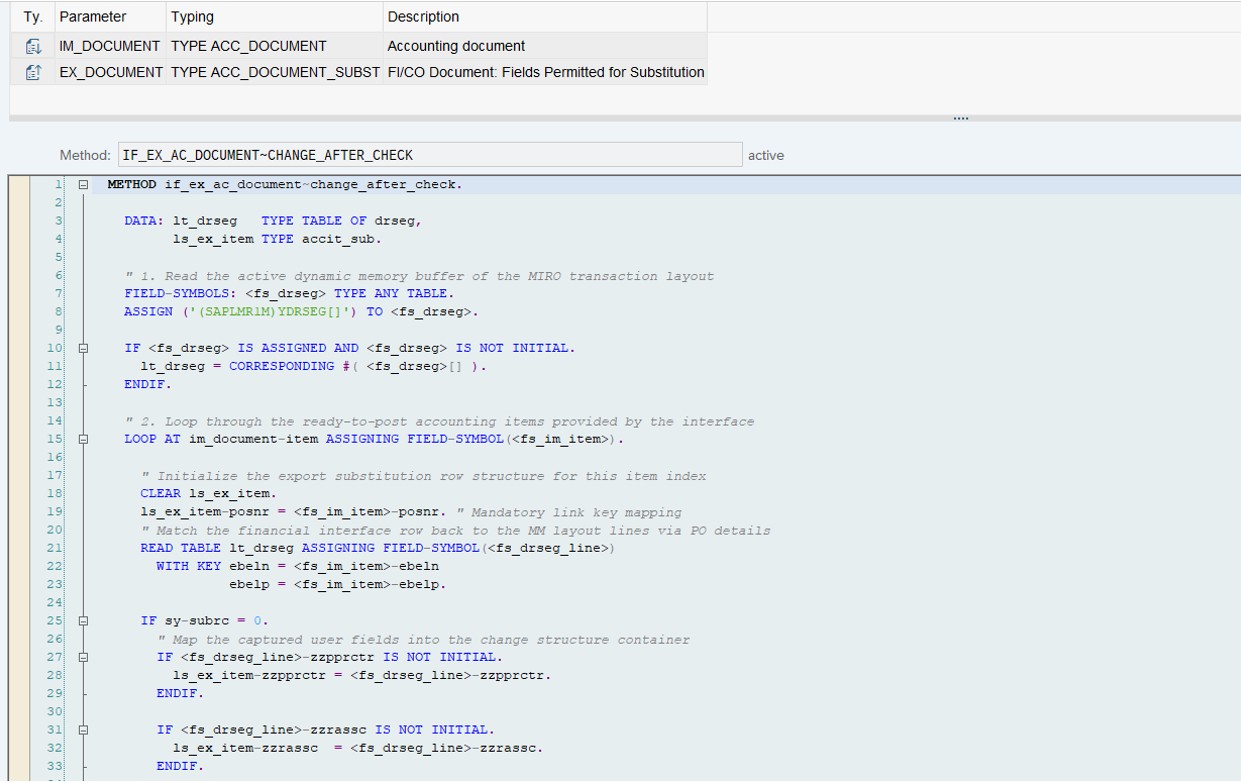
The implementation logic is maintained in the method:

CHANGE_AFTER_CHECK

This method can be used to handle the required logic after the accounting document check.
 

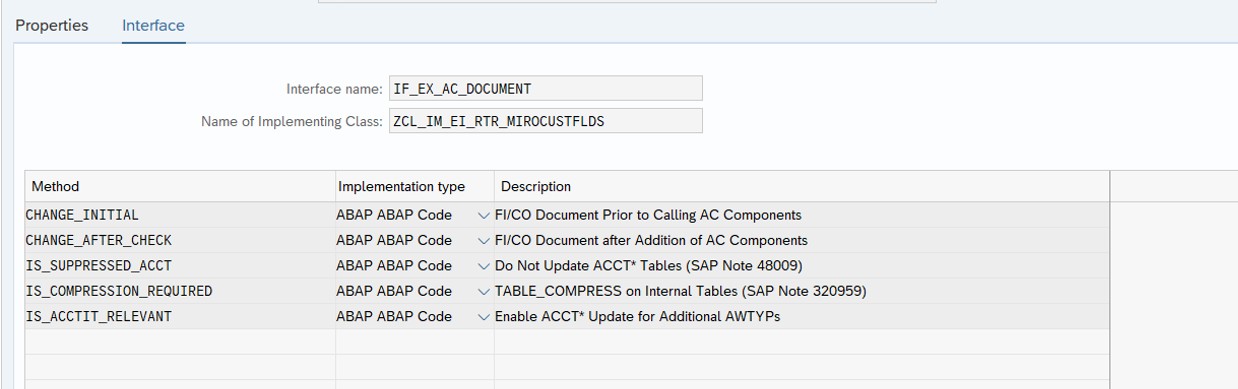
Show the AC_DOCUMENT BAdI implementation and the:

CHANGE_AFTER_CHECK
 
scr2

Implementation logic:

Method : Change_After_Check

Logic inside the method:

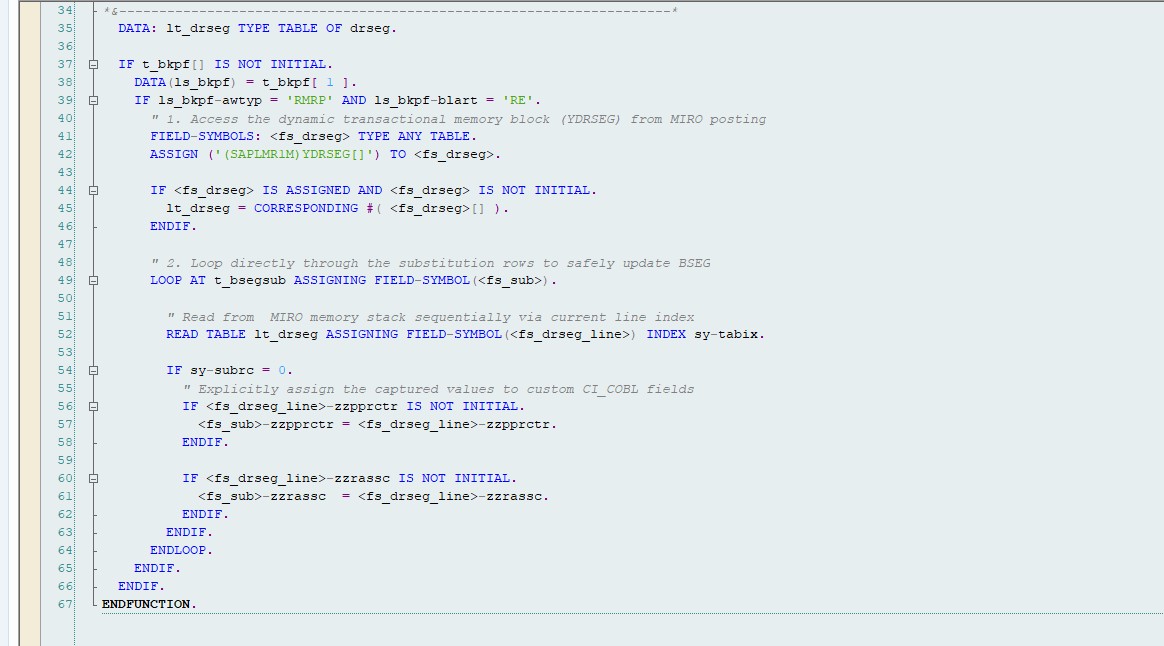
Step 4: Map these fields to BSEG table

Need to implement a BTE to achieve this functionality, SAP doesn’t update the additional field values to BSEG automatically.

BTE implementation

FIBF Tcode -> menu Settings -> Products -> of a customer -> Create a product

FIBF Tcode -> menu Settings -> Process modules -> of a customer

Choose the event 00001120(DOCUMENT POSTING:  Field substitution header/items)

Copy the sample interface FM SAMPLE_INTERFACE_00001120

Add the new FM and newly created product in the previous step of FIBF config.

Process = 00001120

Function Module = ZFM

Product = ZPRODUCT


Logic inside the ZFM

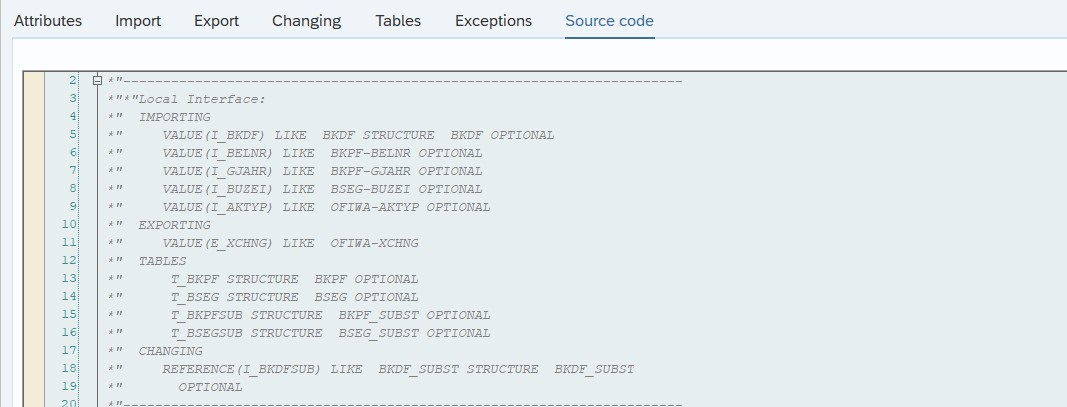
Interface structure of the ZFM :

Step 5: Output

If the fields are not visible at MIRO, Adjust the fields layout using the Tcode : OLMRLIST

Program : SAPLMR1M  Screen : 6310

MIRO :

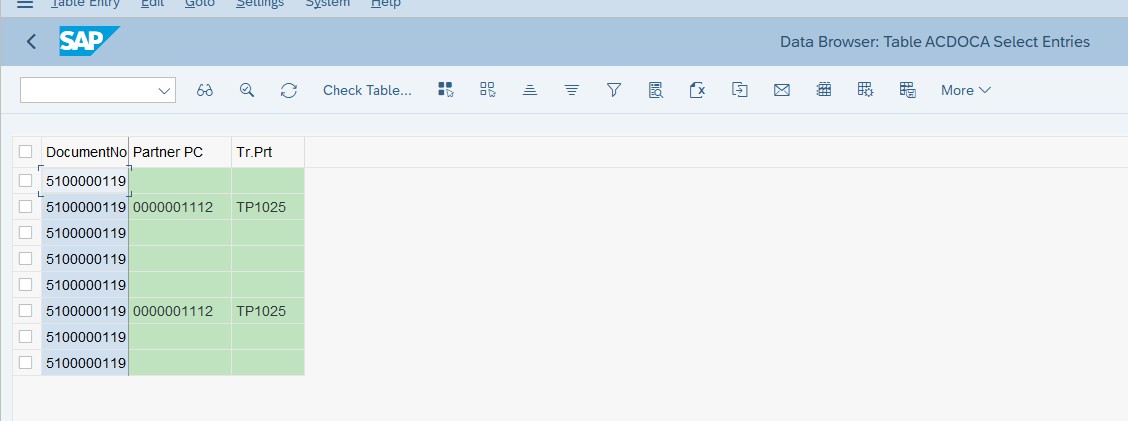
ACDOCA:

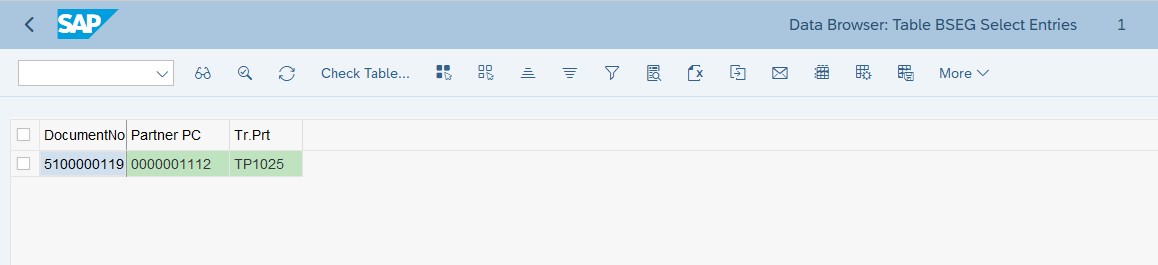
BSEG:

Common Mistakes Developers Make

❌ Fields Added to the Wrong Structure

Adding the fields only to an unrelated structure will not satisfy the accounting requirement.

Fix: For accounting fields, start with CI_COBL as described in the implementation.

❌ Implementing CI_DRSEG_CUST When It Is Not Required

CI_DRSEG_CUST and MRM_ITEM_CUSTFIELDS are optional when the requirement is only for accounting.

Fix: Use this step only when the fields are required at material document level.

Frequently Asked Questions

Can custom fields be added to MIRO?
Yes. Custom fields can be added to the relevant structures and made available in the MIRO process.

Is CI_DRSEG_CUST mandatory?
No. According to this implementation, it is optional and is required when the fields are needed at material document level.

Are the custom fields automatically updated in ACDOCA in S/4HANA?
The document states that in an S/4HANA system, SAP updates the fields and their values to ACDOCA automatically.

Internal Linking

While troubleshooting the implementation, if you need to trace the ABAP execution flow, you can refer to our guide on debugging ABAP programs effectively.

For projects where the MIRO process handles large volumes of accounting data, our guide on Top ABAP Performance Tuning Techniques can also help optimize database access and application processing.

🎉 Final Thoughts

Adding custom fields to MIRO is only one part of the requirement when those values also need to flow into accounting documents. The complete implementation needs to consider where the fields are required and how their values should be transferred.

In this scenario, CI_COBL is used as the starting point, with optional material-document enhancements through CI_DRSEG_CUST and MRM_ITEM_CUSTFIELDS. For the accounting flow, the implementation covers ACDOCA handling and a BTE-based approach for BSEG mapping.

Finally, validating the values in MIRO, ACDOCA, and BSEG confirms that the complete flow is working as expected.

Share article

Kishore Thutaram

SAP Solution Architect | 16+ Years' Experience in SAP | Sharing Practical SAP Knowledge | Engineering Graduate with Expertise in SAP Architecture

https://fiowelt.com

Leave a Reply

Your email address will not be published. Required fields are marked *